AI Pricing Optimizer
Get AI-powered pricing recommendations based on true cost analysis, market data, and demand.

AI Pricing Optimizer
- Use AI-powered recommendations to price your products for healthy profit margins
- Understand the true cost of every item you bake, including ingredients, labor, overhead, and packaging
- Test price changes with what-if scenarios before applying them to your menu
What is the Pricing Optimizer?
The AI Pricing Optimizer analyzes your recipe costs and market data to recommend prices that keep your bakery profitable. Instead of guessing or copying competitor prices, you'll see exactly how much each product costs to make—and what price gives you a healthy margin.
This tool is available on the Scale tier and works best when your recipes and ingredients are set up in BakeOnyx.
How to Access the Pricing Optimizer
- Log in to your BakeOnyx dashboard
- Go to Recipes in the main menu
- Click Pricing at the top of the page
You'll see a list of your recipes with current prices and cost information.
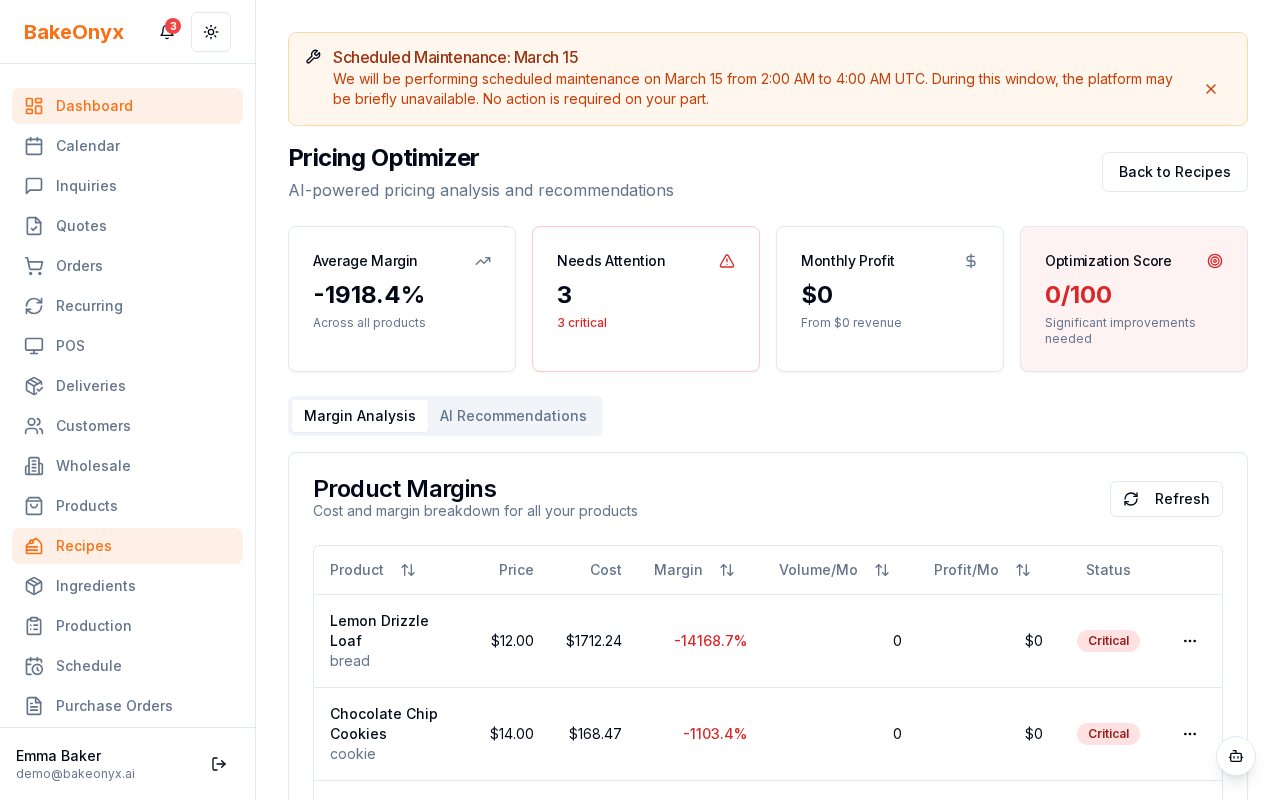
Understanding Your Product Costs
Before you get pricing recommendations, the Pricing Optimizer calculates the true cost of each product:
- Ingredient costs: Based on the ingredients in your recipe and current inventory prices
- Labor costs: Time spent mixing, shaping, and baking (estimated from your recipe)
- Overhead: Utilities, rent, and equipment costs spread across your production
- Packaging: Boxes, bags, labels, or other materials used per item
The total of these costs is your true cost per unit. Your current price is compared to this cost to show your margin.
Checking Your Margin Health
Next to each product, you'll see a margin status:
- Healthy (green): Your margin is strong and sustainable
- Warning (yellow): Your margin is thin—consider a price increase
- Critical (red): You're losing money or barely breaking even on this item
Getting AI Pricing Recommendations
- Find the product you want to reprice in the list
- Click on the product row to open its details
- Look for the AI Recommendation section
- Review the suggested price and confidence score (higher = more reliable)
- The recommendation considers your costs, local market data, and demand patterns
The AI takes into account whether your product is in high demand or has slower sales. A popular item might support a higher price, while slower-moving products may need competitive pricing.
Testing Price Changes with What-If Scenarios
Before you commit to a new price, test it out:
- In the product details, enter a new price in the What-If Price field
- Click Analyze to see how the new price affects your margin
- Review the new margin percentage and profit per unit
- If you're happy with the scenario, click Apply Price to update your menu
Applying Prices to Multiple Products
If you want to update prices for several products at once:
- Select multiple products using the checkboxes on the left
- Click Batch Apply at the top of the list
- Choose whether to apply AI recommendations or a percentage increase across all selected items
- Review the changes and confirm
Next Steps
- Creating a Recipe — Set up accurate recipes so cost calculations are correct
- Adding and Managing Ingredients — Keep ingredient prices current for accurate costing
- AI Inventory Predictions — Forecast demand to help inform pricing decisions