AI Inventory Predictions
Let AI predict ingredient usage and suggest when to reorder based on order patterns.

AI Inventory Predictions
- How to view AI-powered predictions for ingredient usage and reorder timing
- How to use stockout alerts and anomaly detection to prevent shortages and waste
- How to act on reorder suggestions to keep your bakery stocked efficiently
What Are AI Inventory Predictions?
AI Inventory Predictions analyze your order history, seasonal patterns, and current stock levels to forecast how much of each ingredient you'll need in the coming weeks. Instead of guessing when to reorder, BakeOnyx tells you exactly when you're likely to run out—and suggests the right time to place your next order.
This feature is available on the Growth+ tier and helps you:
- Avoid running out of critical ingredients mid-week
- Reduce waste from over-ordering perishable items
- Spot unusual usage patterns that might signal a problem
- Plan orders around supplier schedules and lead times
Accessing Your Predictions Dashboard
- From the main BakeOnyx dashboard, click Inventory in the left sidebar.
- Select Predictions from the submenu.
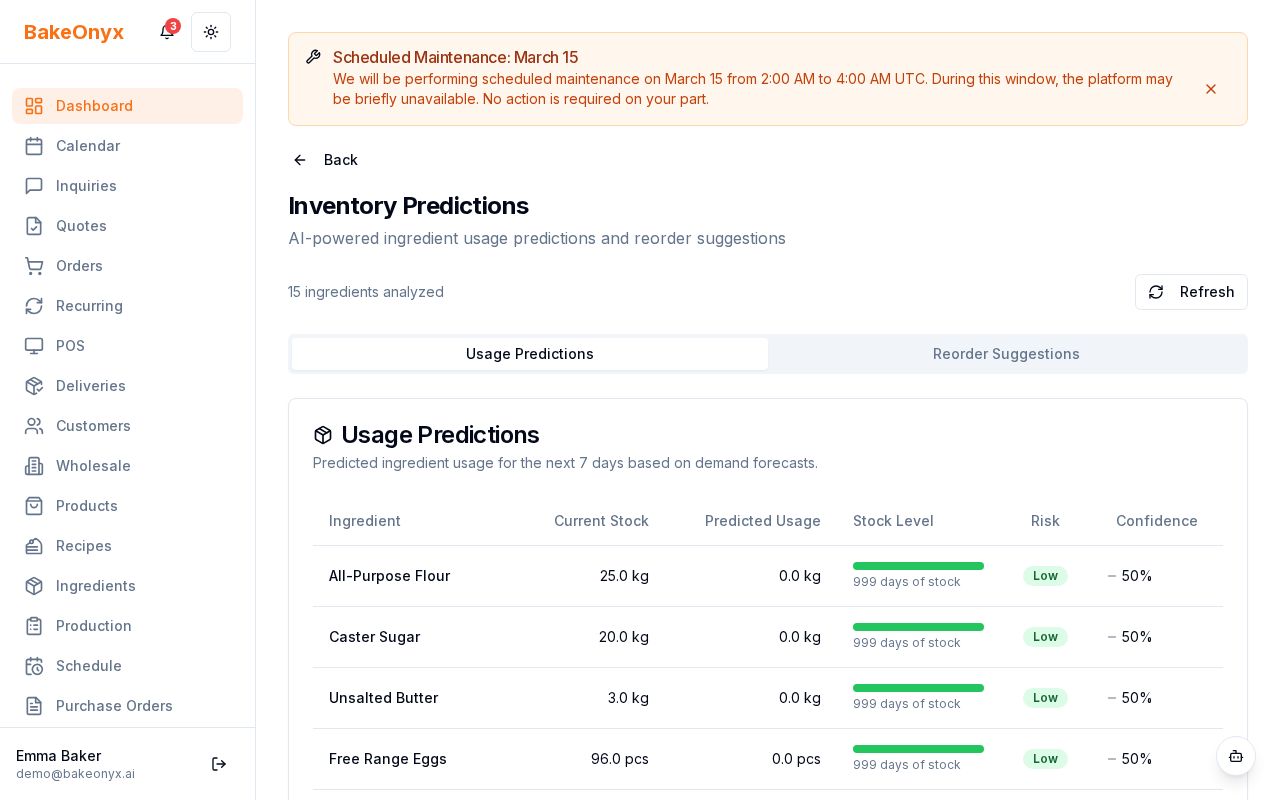
- You'll see your Predictions Dashboard with forecasts for all tracked ingredients.
Understanding Your Predictions
Usage Forecasts
The AI predicts how much of each ingredient you'll use over the next 2–4 weeks based on your recent order patterns. The forecast accounts for seasonal trends (like higher flour usage before holidays) and day-of-week patterns (like increased butter orders on Fridays).
Reorder Suggestions
BakeOnyx recommends the best time to place your next order for each ingredient. This timing factors in:
- Your current stock level
- Predicted usage rate
- Typical supplier lead time
- Shelf life of the ingredient
Green indicators mean you're well-stocked. Yellow means it's time to think about ordering soon. Red means you should order now.
Stockout Alerts
If the AI predicts you'll run out of an ingredient before your next planned order arrives, you'll see a stockout alert. This gives you time to contact your supplier or find an alternative source.
Usage Anomaly Detection
The AI flags unusual spikes or drops in ingredient usage. This might indicate:
- A new popular recipe driving higher demand
- A supplier quality issue causing more waste
- A data entry error in your orders
Acting on Predictions
- Review the Reorder Suggestions column at least twice a week.
- For any ingredient showing a yellow or red status, note the suggested reorder date.
- Contact your supplier and place orders according to the AI's timeline—not too early (to avoid spoilage) and not too late (to avoid stockouts).
- If you see a stockout alert, act immediately. Contact your backup supplier or adjust your production schedule.
- If you notice an anomaly, click the alert to see more details. Investigate whether it's a real change in demand or a data issue.
Tips for Best Results
- Keep recipes updated: If you change a recipe, update it in BakeOnyx so the AI predicts the right ingredient amounts.
- Log all orders: The more complete your order history, the better the predictions. Make sure every ingredient purchase is recorded.
- Adjust for planned changes: If you're planning a big event or menu change, let your supplier know. The AI can't predict surprises.
- Review seasonality: After your first holiday season, the AI will factor in seasonal demand patterns automatically.
Next Steps
- Adding and Managing Ingredients — Set up your ingredient list for accurate predictions
- Creating a Recipe — Update recipes so the AI predicts usage correctly
- AI Agents (Scale Plan) — Automate reordering with AI agents on higher tiers