Expense Reports and VAT Summary
View expense summaries by category and period, with VAT totals for tax reporting (Growth plan and above).
See exactly where your money goes: expense reports break spending down by category and time period and give you VAT totals for tax reporting (Growth+). Here's how to view, filter, and export them.

Understanding Expense Reports
BakeOnyx's expense reports give you a clear picture of where your money is going. Whether you're tracking flour costs, packaging, or utilities, these reports help you see spending patterns and prepare for tax time. If you're on the Growth plan or higher, you'll also see detailed VAT information broken down by category.
Expense reports are especially useful when you need to:
- Review spending by category (ingredients, supplies, labor, etc.)
- Analyze costs over specific time periods
- Prepare VAT returns for your accountant
- Identify areas where you might be overspending
Accessing Your Expense Reports
- From the main dashboard, click Reports in the left navigation menu.
- Select Expenses from the reports options.
- You'll see your expense summary displayed with totals by category.
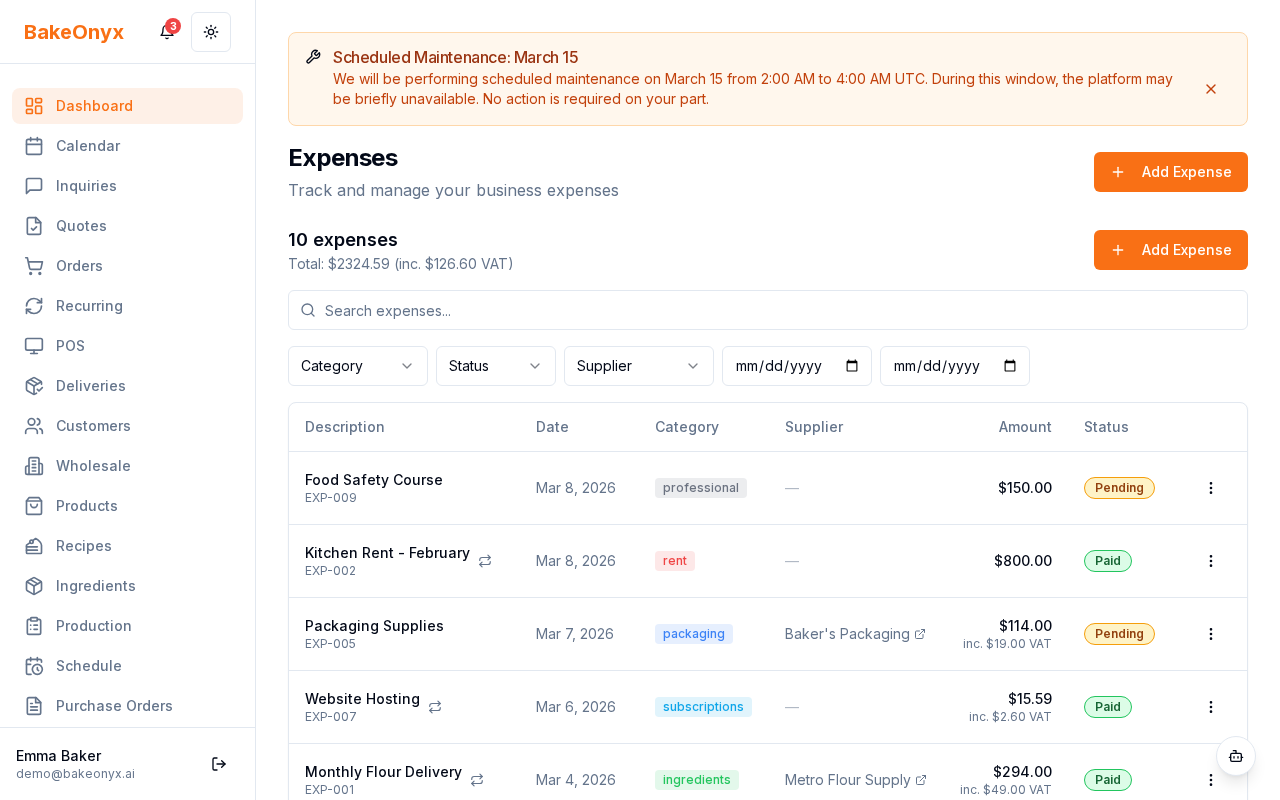
Filtering Your Expense Report
By default, the report shows all expenses from the current month. You can customize this to see exactly what you need:
- Look for the filter options at the top of the report.
- Click on the Date Range dropdown to select a custom period (this week, this month, last quarter, or a custom date range).
- Click on the Category dropdown to filter by specific expense types. You can select one category or multiple categories at once.
- Click Apply Filters to update your report.
Reading Your Expense Summary (Growth Plan and Above)
If you're on the Growth plan or higher, your expense report includes three key columns:
- Gross Amount: The total cost of the expense before VAT.
- VAT: The value-added tax amount (calculated based on your VAT rate).
- Net Amount: The actual cost to your business after VAT is accounted for.
These breakdowns are organized by expense category, so you can see VAT totals for ingredients separately from utilities, for example. This gives your accountant exactly the information they need for VAT returns.
Using Reports for Tax Preparation
When tax time arrives, your expense reports are a lifesaver. Here's how to use them:
- Run a report for your full tax year or the period your accountant requests.
- Export or save the report (look for a download or print option).
- Share the VAT summary with your accountant—it shows exactly how much VAT you've paid on business expenses.
- Use category breakdowns to support your tax deductions.
Best Practices
- Review regularly: Check your expense report monthly to catch any unusual spending patterns early.
- Categorize correctly: Make sure expenses are logged in the right category when you enter them—this makes reports more useful.
- Keep VAT updated: If your VAT rate changes, update it in your Business Profile Settings so future reports are accurate.
Next steps
- Learn more about all available reports in Reports Overview
- Update your VAT rate and business details in Business Profile Settings