Setting Up Par Levels
Define standard daily production quantities for each recipe to ensure consistent output.
Setting Up Par Levels
- Define standard daily production quantities for each recipe
- Set different par levels for each day of the week (e.g., more croissants on weekends)
- Let BakeOnyx use par levels as baseline targets for production planning
What Are Par Levels?
Par levels are the standard quantities you want to produce each day for a specific recipe, regardless of customer orders. Think of them as your "safety stock"—the amount you always want on hand to meet customer demand and keep your display cases full.
For example, you might set a par level of 20 croissants for weekdays but 40 for weekends. BakeOnyx's production scheduler uses these par levels as baseline targets, ensuring you're always prepared even on slower order days.
How to Set Up Par Levels
Step 1: Navigate to Par Levels
- Log in to BakeOnyx and go to your Dashboard
- Click Production in the left sidebar
- Select Par Levels from the submenu
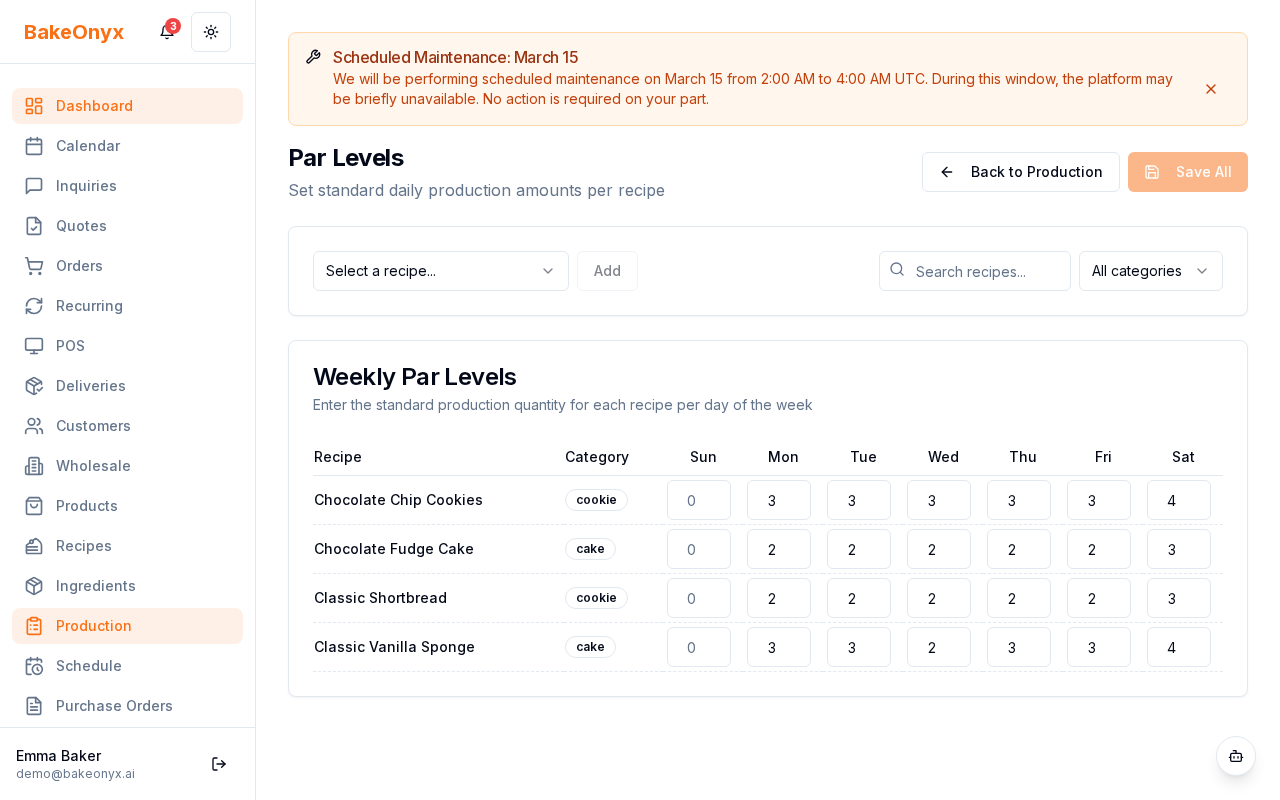
You'll see a grid with all your recipes listed on the left and the days of the week across the top (Sunday through Saturday).
Step 2: Select a Recipe
- Scroll through the recipe list on the left side to find the recipe you want to set par levels for
- Click on the recipe name to select it
Only recipes you've already created in BakeOnyx appear here. If you don't see a recipe, you'll need to create it first (see "Next steps" below).
Step 3: Enter Daily Quantities
- For each day of the week, click the quantity field and enter your standard production number
- Use the same unit you defined when creating the recipe (e.g., individual croissants, dozens, loaves)
- Press Enter or click outside the field to save
You can set different quantities for each day. For example:
- Sunday: 30
- Monday–Friday: 20
- Saturday: 50
Step 4: Activate or Deactivate Par Levels
- Each recipe has a toggle switch next to its name
- Make sure the toggle is on (highlighted) to activate par levels for that recipe
- If you want to temporarily stop using par levels for a recipe, click the toggle to turn it off
When a par level is active, BakeOnyx includes it in production planning. When it's inactive, the production scheduler ignores it and only plans based on actual customer orders.
Step 5: Review and Adjust
- After setting par levels, check your Production Calendar to see how they affect your daily production plan
- If production quantities seem too high or too low, come back to this page and adjust
- It's normal to fine-tune par levels over a few weeks as you see how they work in practice
Best Practices
- Update seasonally: Adjust par levels for seasonal items (e.g., higher pumpkin muffins in fall)
- Consider shelf life: Don't set par levels higher than what you can sell before items expire
- Account for events: Temporarily increase par levels before holidays or special events
- Monitor waste: If you're throwing away unsold items, lower your par levels
Next Steps
- Creating a Recipe — Add new recipes to BakeOnyx before setting par levels
- Using the Calendar — See how par levels affect your production schedule
- Configuring Production Equipment and Staff — Ensure you have the capacity to meet your par levels