The Unified Inbox
One place for every customer conversation — web chat, email, WhatsApp, Messenger, and SMS — with filters, assignment, and AI-drafted replies.
One inbox for every conversation
The Inbox brings every customer message into a single place, no matter which channel it arrived on: web chat, email, WhatsApp, SMS, Instagram DM, and Facebook Messenger. It replaces the old separate Messages screen, so you no longer juggle several apps to keep up with customers.
Reading the list
Each row in the inbox shows you, at a glance:
- The customer name and a channel badge (so you know where the message came from)
- A preview of the last message and how long ago it arrived
- An unread badge so nothing slips past
- A draft indicator when the AI assistant has already written a suggested reply
Finding what needs you now
Use the filters at the top to focus:
- Status — Open, Unread, Awaiting customer, Awaiting staff, Resolved, or Escalated
- Channel — show only WhatsApp, email, web chat, and so on
- Assignee — see the conversations assigned to a particular team member
Opening a conversation
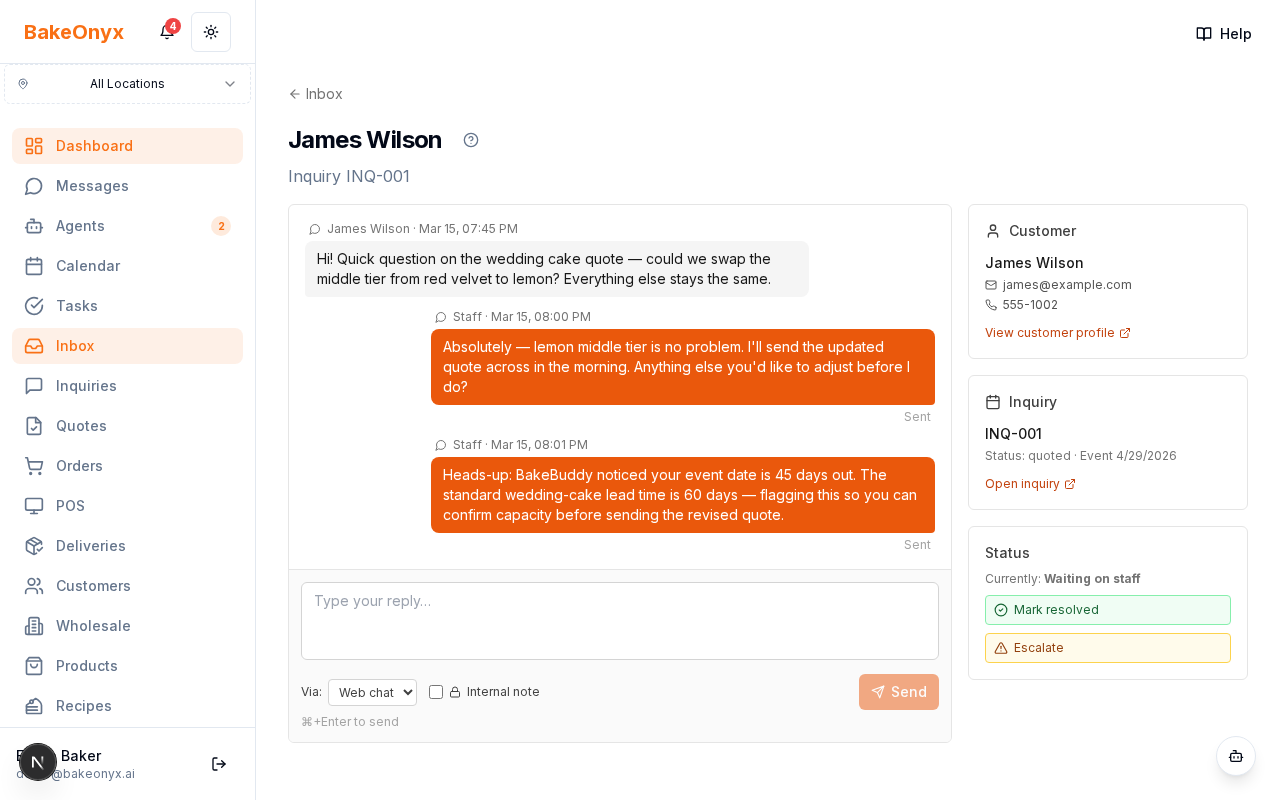
Click any row to open the full thread. Every message is labelled by who sent it — the customer, your team, the AI assistant, or an internal note that only staff can see. The composer at the bottom lets you reply, choose the reply channel, attach files, or leave a private internal note.
Connected context
A conversation can be linked to an inquiry, an order, or a customer. That means opening an inquiry or a customer record shows you the same conversation in context — no copying and pasting between screens.
Next steps
- Turn on AI-drafted replies so a suggested response is waiting on each new message
- Connect WhatsApp, Messenger, and SMS so those channels feed into the inbox