AI Agents (Scale Plan)
Specialized AI agents that proactively monitor your production, inventory, and business analytics.
AI Agents (Scale Plan)
- How AI Agents proactively monitor your production, inventory, and business metrics
- How to configure notification preferences and review agent suggestions
- How to understand and act on agent recommendations in your bakery workflow
What are AI Agents?
AI Agents are specialized assistants that run automatically on your BakeOnyx account to help you make smarter decisions about production, inventory, and customer engagement. Unlike tools you manually check, agents work in the background—monitoring your data 24/7 and alerting you when they spot trends, risks, or opportunities.
The Scale Plan includes four specialized agents:
- Production Agent: Tracks your baking schedule, matches demand to batches, monitors equipment usage, and suggests batching optimizations
- Inventory Agent: Watches stock levels, flags items at risk of running out, suggests reorders, and detects unusual ingredient usage patterns
- Analytics Agent: Identifies sales trends, spots anomalies in your data, and highlights business opportunities
- Marketing Agent: Recommends product promotions, targets customers for campaigns, and suggests loyalty engagement strategies
Accessing Your AI Agents Dashboard
- Log in to BakeOnyx and navigate to Dashboard
- In the left sidebar, click Agents
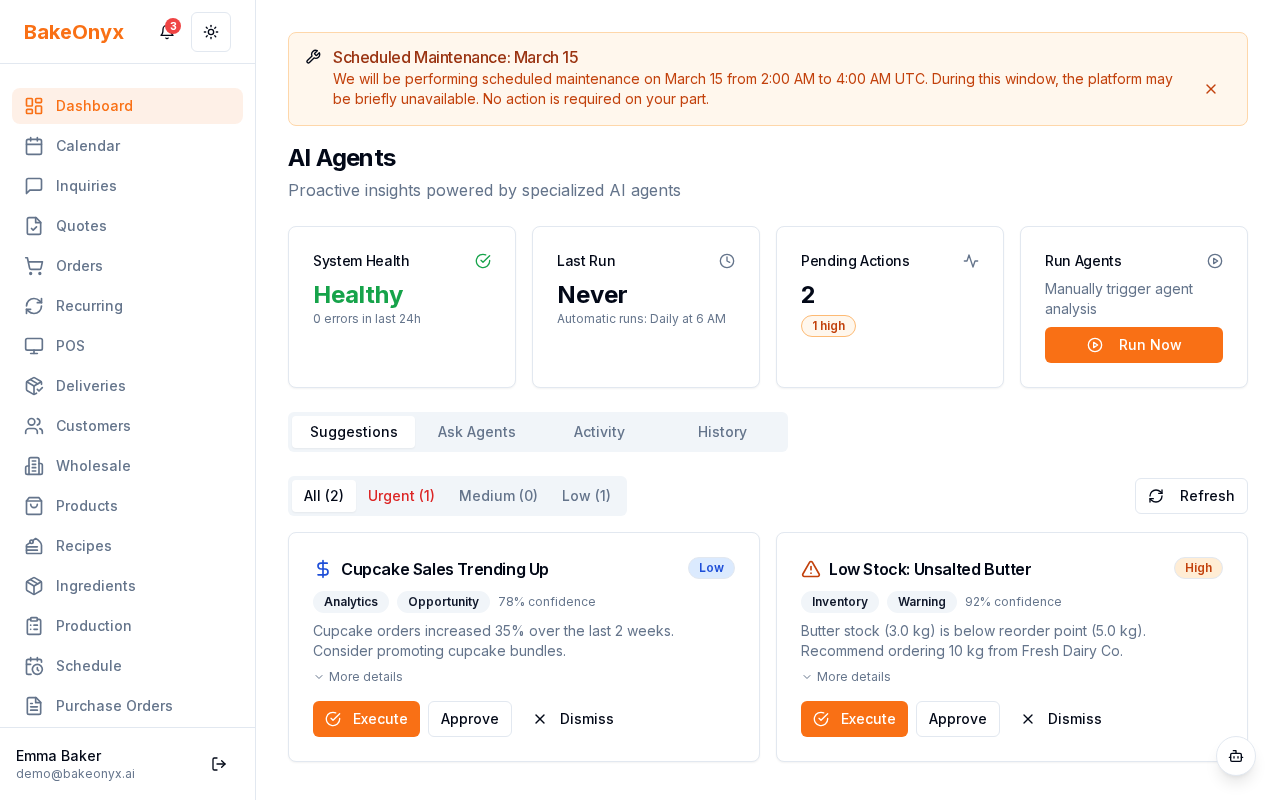
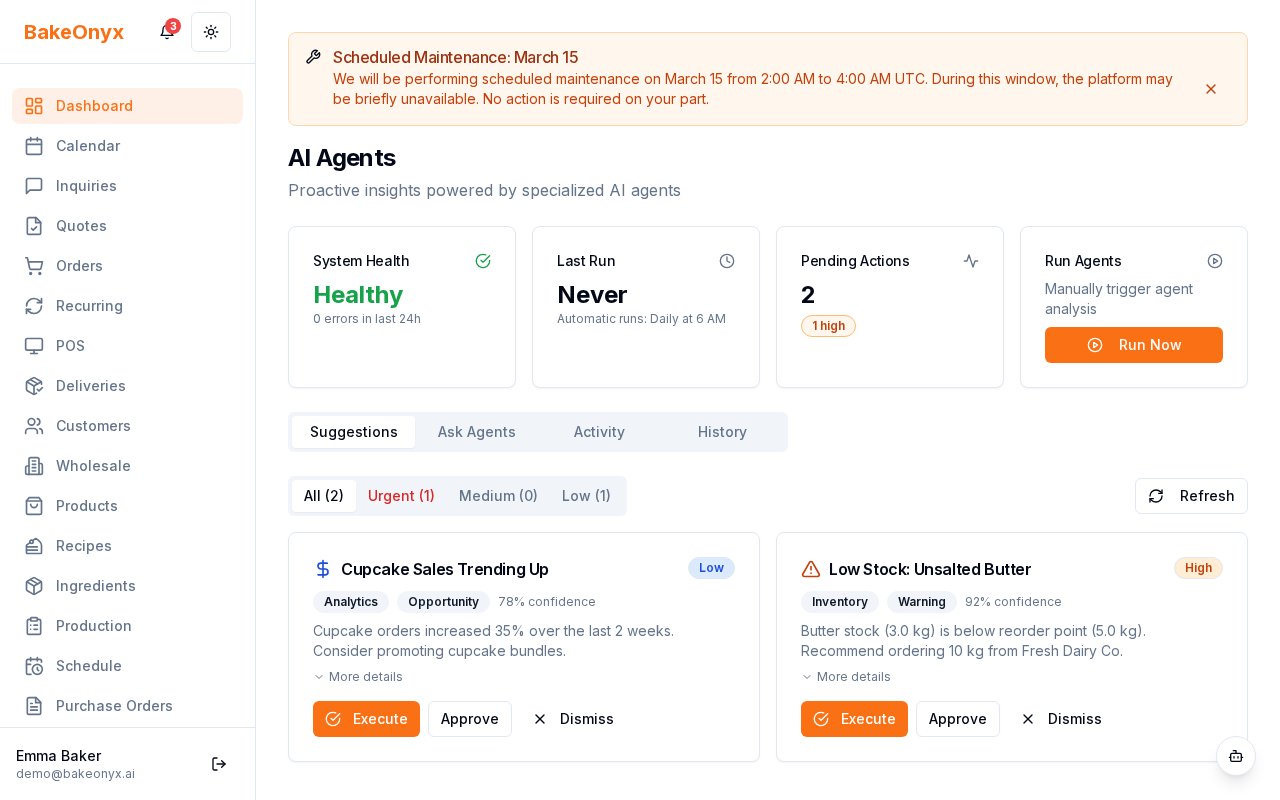
- You'll see your agents dashboard with activity summaries, health status, and recent suggestions
How Agents Work
Agents monitor your bakery in two ways:
- Scheduled runs: Agents check your data daily and surface insights automatically
- Event-driven triggers: When something significant happens (like a sudden sales spike or inventory drop), agents respond immediately
When multiple signals happen at once—for example, high demand + low stock + equipment downtime—an intelligent planner routes the situation to the right agent or agents to give you the best advice.
Reviewing Agent Suggestions
- On the Agents dashboard, scroll through Recent Suggestions
- Each suggestion shows the agent name, what it found, and a recommended action
- You can:
- Approve: Accept the suggestion and mark it as actioned
- Dismiss: Close the suggestion without acting on it
- Execute Now: Immediately implement the suggestion (for eligible items)
Configuring Notification Preferences
- From the Agents dashboard, click Notification Preferences (usually in the top right or settings area)
- Choose your alert levels:
- Critical/Urgent: Get email alerts for high-priority suggestions immediately
- Daily Digest: Receive a summary email at a time you choose (timezone-aware)
- Push Notifications: Enable alerts on your phone or browser
- Set your preferred timezone to ensure digests arrive at the right time
- Click Save
Viewing Execution History
Every action agents take is logged for your records. To review:
- On the Agents dashboard, click Execution History
- You'll see a complete audit trail showing:
- Which agent took the action
- What was suggested or executed
- The timestamp and status (approved, dismissed, auto-executed)
- Results or outcomes
Getting the Most from Your Agents
- Check your Agents dashboard at least weekly to stay on top of suggestions
- Use the daily digest email as a quick morning briefing on what your agents found overnight
- Review Execution History monthly to understand patterns in what your agents recommend
- Adjust notification preferences if you're getting too many or too few alerts
Next Steps
- Learn about AI Usage and Plan Limits to understand how many agent runs you get each month
- Set up your recipes and batches so agents can accurately match demand to production
- Ensure your ingredients and inventory are up to date for accurate stock monitoring