AI Usage and Plan Limits
Understand how AI usage is metered, daily limits, and what features are available on each plan.
Which AI features you get and your daily usage limits depend on your plan — Essentials, Growth, or Scale. Here's what each tier includes, how the daily limits work, and how to monitor your usage.
What AI Features Are Available on Your Plan?
BakeOnyx offers AI-powered tools at three subscription levels. Here's what you get with each:
Essentials Plan
- Bake Buddy Chat — Your AI assistant for answering questions about your bakery, recipes, and operations
Growth Plan
- Bake Buddy Chat — Full access to your AI assistant
- Inventory Predictions — AI forecasts ingredient usage based on your sales patterns
- Basic Customer Insights — AI-generated summaries of customer trends and preferences
Scale Plan
- Bake Buddy Chat — Full access
- Inventory Predictions — Advanced forecasting with seasonal adjustments
- Full Customer Insights — Detailed analytics, segmentation, and behavior analysis
- AI Agents — Automated workflows for routine tasks like order processing and inventory reordering
- Pricing Optimizer — AI recommendations for product pricing based on demand and costs
Understanding Daily Usage Limits
Each plan has a daily limit on how many times you can use AI features. These limits reset every 24 hours and are designed to keep costs predictable while giving you plenty of room to run your bakery.
Daily limits vary by feature and plan tier. For example, your Essentials plan might allow 50 Bake Buddy chat messages per day, while a Growth plan allows 200. The more advanced your plan, the higher your limits.
How to Check Your Current AI Usage
You can see exactly how much of your daily limit you've used at any time. Here's how:
- Log into BakeOnyx and go to Settings (usually found in the bottom left or top right menu)
- Select AI Settings from the menu
- Look for the AI Usage section
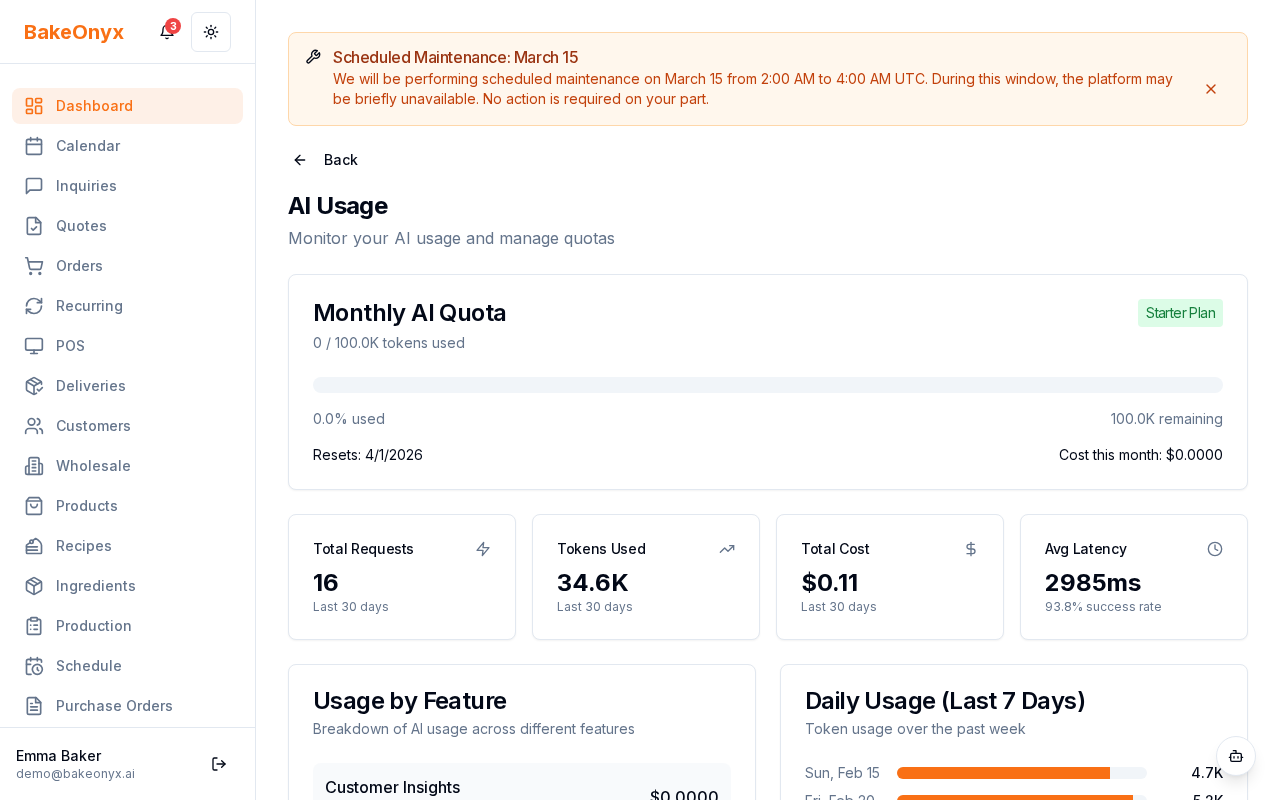
You'll see a breakdown of each AI feature you have access to, along with a usage bar showing how many requests you've made today and how many you have left. The bar fills up as you use your daily allowance.
What Happens When You Approach Your Limit?
BakeOnyx sends you an email alert when you're approaching 80% of your daily limit. This gives you a heads-up so you can plan ahead if you need more AI usage.
If you consistently hit your limits and need more capacity, consider upgrading to the next plan tier. Higher plans come with significantly higher daily limits and additional features.
Tracking Usage Over Time
Your AI usage is logged automatically in BakeOnyx. This means you can review your usage patterns to understand which features you rely on most. Use this information to decide if your current plan is the right fit or if you should upgrade.
If you have questions about your usage or think there's an error, reach out to our support team — they're happy to help.
Next Steps
- How AI Features Work Behind the Scenes — Learn more about how BakeOnyx's AI tools operate
- Creating a Recipe — Start using Bake Buddy to help with recipe management
- Adding and Managing Ingredients — Set up your inventory to get the most from AI predictions