Fast Bakery Point of Sale: Split Payments & Automatic Stock Deduction
BakeOnyx Point of Sale rings up counter sales instantly with split payments and automatic change calculation—while syncing every transaction to your inventory and reports in real time.
Quick answer
BakeOnyx Point of Sale rings up counter sales instantly with split payments and automatic change calculation. Stock deducts in real time, and every transaction syncs to your inventory and reports—eliminating manual data entry and invisible sales.
Fast Bakery Point of Sale: Split Payments & Automatic Stock Deduction
The Problem: Your Till and Your Stock Don't Talk
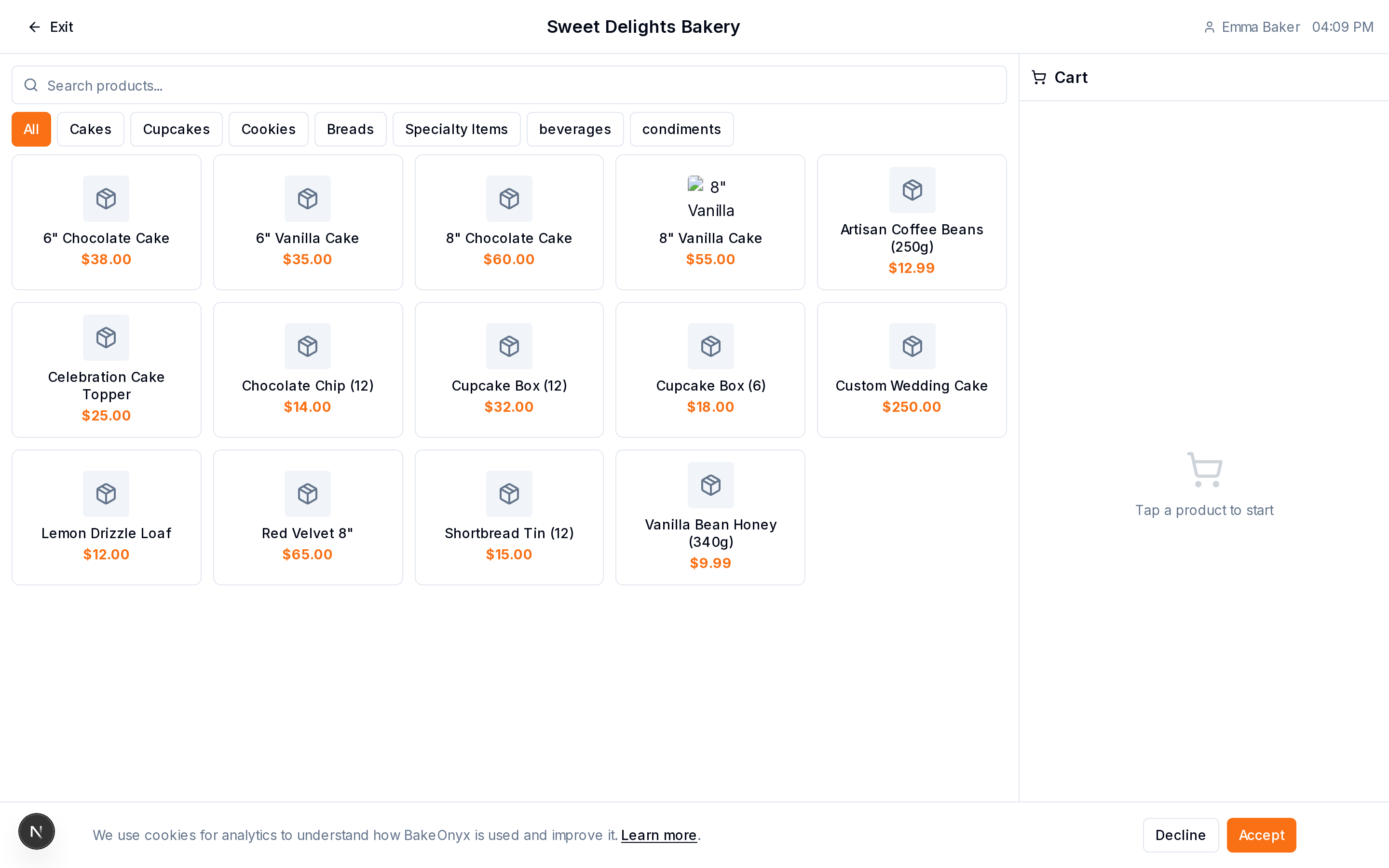
If you're running a bakery counter, you know the friction. A customer walks up. You ring them up on a separate till or notebook. They pay with cash and card. You calculate change by hand—or worse, guess. Then you manually update your inventory spreadsheet later (if you remember). By the time you close, your sales data lives in one place, your stock count in another, and your reports are incomplete.
This gap costs you time, accuracy, and visibility. You can't see which items sold fastest at the counter. You don't know if your till balances match reality. And during a lunch rush, slow payment processing means a line out the door.
How BakeOnyx Point of Sale Fixes It
The BakeOnyx Point of Sale feature lets you ring up counter sales fast, accept split payments, calculate change automatically—and deduct stock in real time. Every transaction syncs to your inventory and sales reports instantly. No separate systems. No manual math. No invisible sales.
Step 1: Open the Point of Sale Screen
When a customer approaches your counter, open the Point of Sale interface in BakeOnyx. You'll see a clean, fast checkout screen ready to add items. No clunky separate software or till—it's built into the platform you already use to manage your bakery.
Step 2: Add Items to the Sale
Search for or select the items the customer wants: sourdough, croissants, custom cakes, coffee, whatever you sell at the counter. BakeOnyx displays the price and available stock for each item. Add quantities, and the total updates instantly. If an item is out of stock, you'll see that immediately—no overselling.
Step 3: Apply Discounts or Modifiers (if needed)
If you're running a promotion, offering a loyalty discount, or applying a surcharge, apply it before payment. The total recalculates in real time.
Step 4: Accept Payment—Single or Split
Here's where BakeOnyx saves time during rushes. Accept a full payment in one method (cash, card, mobile pay). Or split the payment: customer pays $15 on card and $10 in cash. BakeOnyx handles the logic. No manual math. No fumbling with two receipts.
Step 5: Calculate Change Automatically
If the customer pays in cash, BakeOnyx calculates change instantly and displays it on screen. No mental math. No error. You hand over the exact amount and move to the next customer.
Step 6: Stock Deducts Automatically
The moment you complete the sale, BakeOnyx deducts the sold items from your inventory automatically. You don't have to remember to update a spreadsheet. Your stock count is live and accurate—whether you're checking it from the counter, your office, or your phone.
Step 7: Sales Data Syncs to Reports
Every counter sale flows into your BakeOnyx dashboard and reports. You can see which items sold, when, at what price, and by payment method. No more invisible sales. Your business data is complete.
Why This Matters for Your Bakery
Speed at the counter: Split payments and automatic change mean faster checkouts, shorter lines, and happier customers during peak times.
Accurate inventory: Stock deducts in real time. You'll never oversell, and your counts match reality—no surprises when you close out the day.
Complete visibility: Counter sales show up in your reports and dashboards. You can analyze which products move fastest, when, and at what margin. That data drives better ordering and pricing decisions.
One system: No juggling a till, a notebook, and a spreadsheet. Everything is in BakeOnyx. Less work. Less room for error.
A Real Scenario
It's Saturday morning—your busiest time. Three customers at the counter. One buys a dozen croissants and a loaf. Another wants two cakes and pays with half cash, half card. A third grabs a coffee and a muffin. With BakeOnyx Point of Sale, you ring each up in seconds, split the second payment without thinking, calculate change instantly, and move on. By noon, you have a complete sales report, your inventory is accurate, and you didn't spend five minutes on math or data entry.
Get Started
If you're tired of managing your counter sales in a separate system—or managing them manually—BakeOnyx Point of Sale is built to save you time and give you the data you need to run a smarter bakery. Start a free trial and see how it works for your business.
The summary, FAQ, and statistics in this section were compiled from public sources and reviewed by the BakeOnyx editorial team. AI-assisted research.
Frequently Asked Questions
Does BakeOnyx Point of Sale work offline?▾
The brief does not specify offline capability. For details on connectivity requirements, please contact BakeOnyx support or check the help documentation.
Can I use BakeOnyx Point of Sale on a tablet or mobile device?▾
The brief does not specify device compatibility. Check with BakeOnyx to confirm whether the Point of Sale feature is available on tablets, phones, or desktop only.
What payment methods does BakeOnyx Point of Sale accept?▾
BakeOnyx Point of Sale accepts cash and card payments, and can split payments between multiple methods. For a complete list of supported payment processors or mobile payment options, consult BakeOnyx documentation.
How does stock deduction work if I have multiple locations?▾
The brief confirms that stock deducts automatically when a sale is completed, but does not specify multi-location behavior. Contact BakeOnyx to learn how stock is tracked across multiple bakery locations.
Can I view sales reports by time of day or by item?▾
BakeOnyx Point of Sale syncs counter sales to your reports and dashboards so you can analyze which items sold and when. For details on specific report filters and views, check the BakeOnyx dashboard documentation.
BakeOnyx Team
Contributing writer at BakeOnyx. Covering bakery business management, recipe costing, and baking industry trends.
Related Posts
Bakery Product and Price Management: Keep Costs Honest
Stop managing prices across spreadsheets and memory. BakeOnyx's Products & Pricing feature links your full product list, variants, and prices to recipes so you always know your true costs.
Wholesale Portal: Self-Service Ordering for Café & Shop Clients
Stop managing wholesale orders via text and email. BakeOnyx's Wholesale Portal lets your café and shop customers place repeat orders themselves at agreed prices—no re-keying, no mistakes.
Build Weekly Rotas in Minutes: BakeOnyx Staff Scheduling
Stop managing rotas in spreadsheets. BakeOnyx Staff Scheduling lets you drag-and-drop shifts, track availability, and see labour costs before you commit—cutting scheduling time and preventing understaffed days.
Related Product Guides
Explore Related Features
Ready to get your time back?
Join hundreds of baking businesses using BakeOnyx to manage orders, recipes, and inventory.
Start Your Free Trial