Build Weekly Rotas in Minutes: BakeOnyx Staff Scheduling
Stop managing rotas in spreadsheets. BakeOnyx Staff Scheduling lets you drag-and-drop shifts, track availability, and see labour costs before you commit—cutting scheduling time and preventing understaffed days.
Quick answer
BakeOnyx Staff Scheduling is a drag-and-drop rota builder that tracks staff availability and displays labour cost in real time, letting bakery owners prevent understaffing and see payroll impact before finalizing the schedule.
Stop Scheduling Your Bakery in Spreadsheets
Every week, the same problem: you're juggling staff availability, shift coverage, and payroll costs across a patchwork of spreadsheets, emails, and text messages. A baker gets sick. Someone's availability changes. You realize mid-week that Saturday is understaffed—or worse, that two people are booked for the same shift. By the time payroll runs, you've already committed to labour costs you didn't plan for.
This is the reality of manual bakery scheduling. It's time-consuming, error-prone, and leaves you flying blind on one of your largest operating expenses.
BakeOnyx Staff Scheduling solves this. It gives you a single, visual place to build your weekly rota, see who's available when, and know your labour cost before you finalize the schedule. No more spreadsheets. No more surprises at payroll.
How It Works
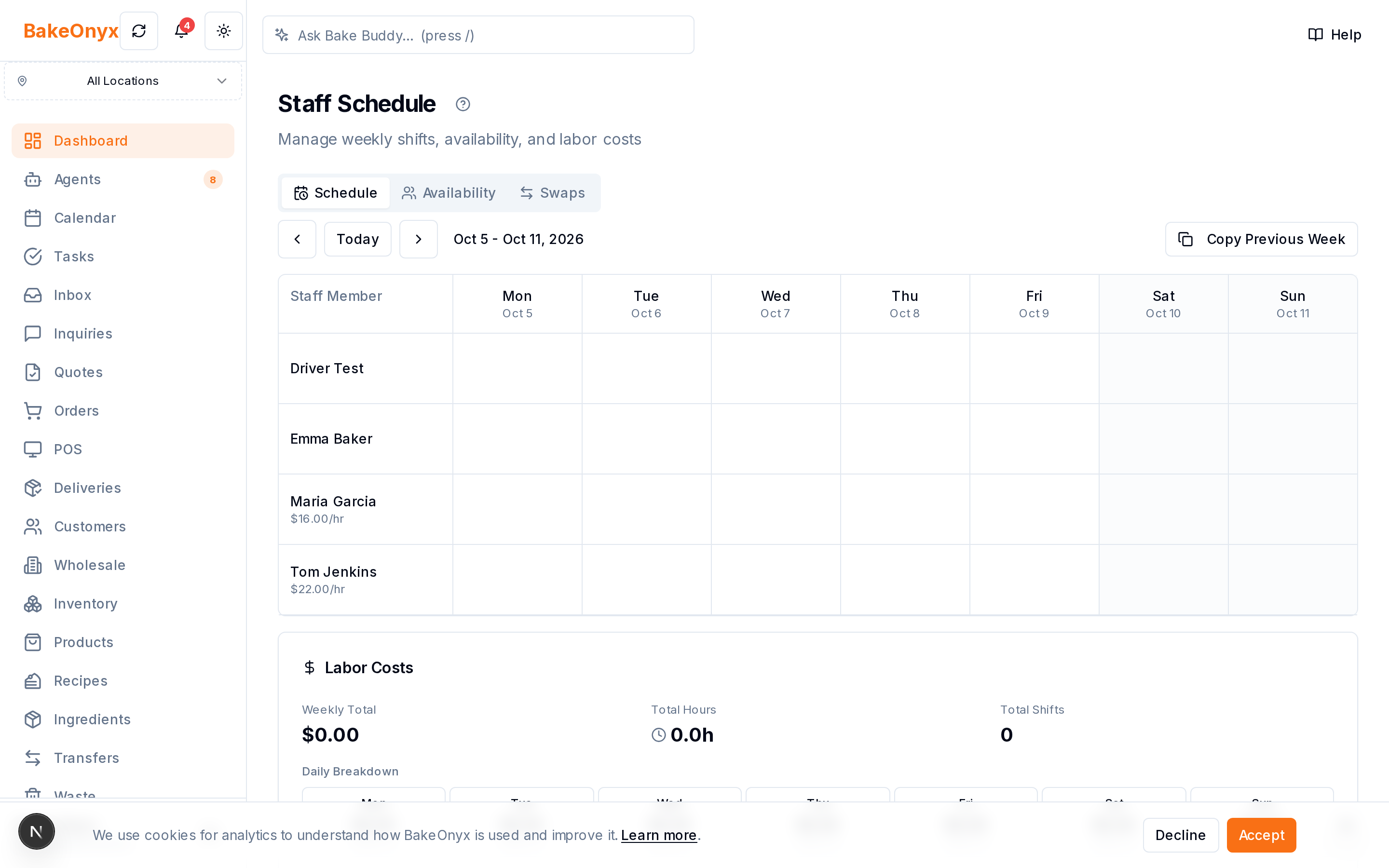
Step 1: Enter Staff Availability
Start by telling BakeOnyx when each team member is available. Rather than chasing people down via text or email, you can log their availability directly into the system—noting which days and times they can work, and any standing constraints (school pickup on Thursdays, second job on weekends, etc.). This becomes your baseline for building the rota.
Step 2: Drag and Drop Shifts Into Your Rota
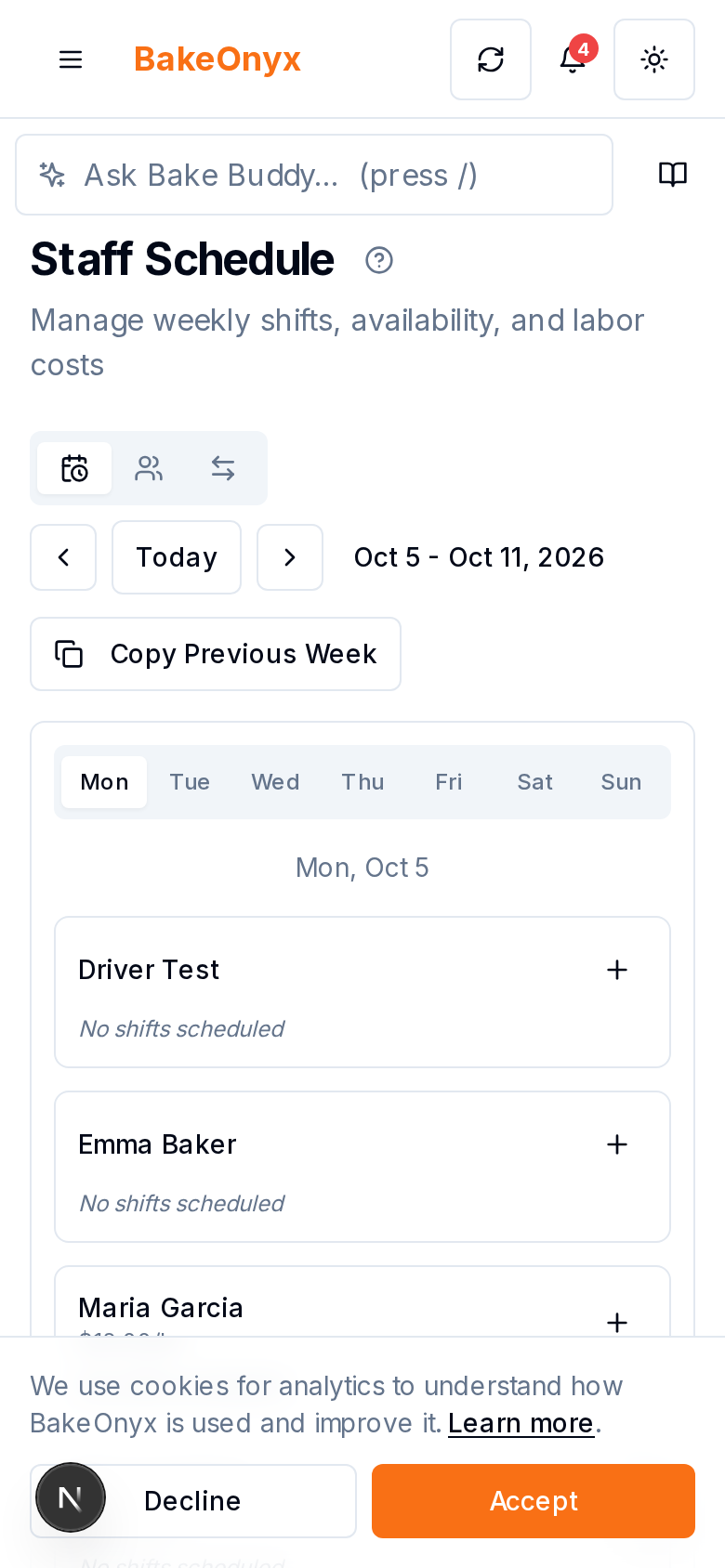
BakeOnyx displays your weekly schedule as a visual grid. You see your shifts (early bake, front counter, closing) and your available staff side by side. Building the rota is as simple as dragging a team member's name onto a shift. No complex formulas. No re-typing names into cells. If someone isn't available for that shift, the system flags it—preventing double-bookings and availability conflicts before they happen.
Step 3: Check Labour Cost in Real Time
As you build your rota, BakeOnyx calculates your total labour cost for the week. You see the number update as you add or swap shifts. This means you can make smart trade-offs while scheduling—do you need two people on Saturday morning, or can you cover it with one? What does adding an extra closer cost? You have the answer before you commit.
Step 4: Finalize and Share
Once your rota is complete and labour cost is approved, you're done. No manual transcription. No emailing PDFs around. Your team sees their schedule in one place, and everyone's on the same page.
Why This Matters for Bakery Owners
Eliminates scheduling chaos. Moving rotas out of spreadsheets and texts means no version conflicts, no miscommunication, and no last-minute scrambles to cover a shift. Your schedule is the single source of truth.
Prevents understaffing on busy days. Because you can see availability and shift coverage at a glance, you catch gaps before Saturday morning arrives. You know whether you're adequately staffed for your busiest periods.
Controls labour costs. Seeing labour cost before payroll runs means no surprises. You can adjust staffing levels to match your budget and sales forecast, not discover overspending after the fact.
Saves scheduling time. Drag-and-drop rota building is faster than spreadsheets. Weekly scheduling that used to take an hour or more can now take 15–20 minutes.
A Better Way to Schedule
Bakery staff scheduling software like BakeOnyx removes the friction from one of the most tedious parts of running a bakery. You get visibility into labour cost, prevent scheduling conflicts, and reclaim time you'd otherwise spend managing rotas manually.
If you're still building rotas in a spreadsheet and texting them around, it's worth seeing how much simpler this can be.
Start a free trial of BakeOnyx and build your next rota in minutes—no credit card required.
The summary, FAQ, and statistics in this section were compiled from public sources and reviewed by the BakeOnyx editorial team. AI-assisted research.
Frequently Asked Questions
How does BakeOnyx prevent double-booking?▾
When you drag a staff member onto a shift, BakeOnyx checks their availability against what you've logged. If they're already assigned to another shift or marked unavailable, the system flags the conflict before you confirm the assignment.
Can I see labour cost by shift or just by week?▾
BakeOnyx shows your total labour cost for the week as you build the rota. This gives you an overview of payroll impact so you can adjust staffing levels to match your budget.
What happens if a staff member's availability changes mid-week?▾
You can update availability in BakeOnyx at any time. If a change creates a conflict with an existing shift, the system alerts you so you can reassign coverage before the shift starts.
Do I have to enter staff availability every week?▾
No. You enter standing availability once (e.g., 'Sarah is always off Thursdays'). You can then note one-off changes week to week without re-entering everything from scratch.
Can my team see their schedule in BakeOnyx?▾
Yes. Once you finalize the rota, your team can view their assigned shifts in BakeOnyx, keeping everyone aligned on the schedule without needing separate emails or texts.
BakeOnyx Team
Contributing writer at BakeOnyx. Covering bakery business management, recipe costing, and baking industry trends.
Related Posts
Bakery Product and Price Management: Keep Costs Honest
Stop managing prices across spreadsheets and memory. BakeOnyx's Products & Pricing feature links your full product list, variants, and prices to recipes so you always know your true costs.
Wholesale Portal: Self-Service Ordering for Café & Shop Clients
Stop managing wholesale orders via text and email. BakeOnyx's Wholesale Portal lets your café and shop customers place repeat orders themselves at agreed prices—no re-keying, no mistakes.
Bakery Waste Tracking: See Where Margin Leaks & Fix It
BakeOnyx Waste Tracking logs every ingredient loss so you can identify where profit is disappearing and cut food costs with real data, not guesswork.
Related Product Guides
Ready to get your time back?
Join hundreds of baking businesses using BakeOnyx to manage orders, recipes, and inventory.
Start Your Free Trial