Staff Holiday Requests: Approve Time Off in One Tap
Stop losing holiday requests in text messages. BakeOnyx Staff Holiday Requests lets employees request time off from their phone while managers approve instantly—and your rota updates automatically.
Quick answer
BakeOnyx Staff Holiday Requests lets bakery employees submit time-off requests from their phone while managers approve in one tap. Your rota and holiday allowance update automatically, eliminating lost requests, double-bookings, and scheduling confusion.
Staff Holiday Requests: Approve Time Off in One Tap
The Problem: Holiday Chaos in Your Bakery
You run a busy bakery. Your team texts you time-off requests. Some get lost. Some arrive at odd hours. By the time you've approved or denied them, you've forgotten who asked for what—and suddenly two of your best bakers have both booked the same Saturday in July.
Worse, you have no clear view of how much holiday each person has left. Sarah thinks she has three days remaining; your records say two. When she books a week off in December, you're caught flat-footed.
Managing staff holidays shouldn't feel like herding cats. Yet for many bakery owners, it's a constant source of scheduling friction, miscommunication, and last-minute staffing gaps.
How Staff Holiday Requests Solves This
BakeOnyx's Staff Holiday Requests feature lets your team request time off directly from their phone, while you approve or deny requests in a single tap. The moment you approve, your rota updates automatically, and your holiday allowance records adjust in real time. No more lost messages, no more double-bookings, no more guessing who has days left.
How It Works
Step 1: Staff Member Submits a Request
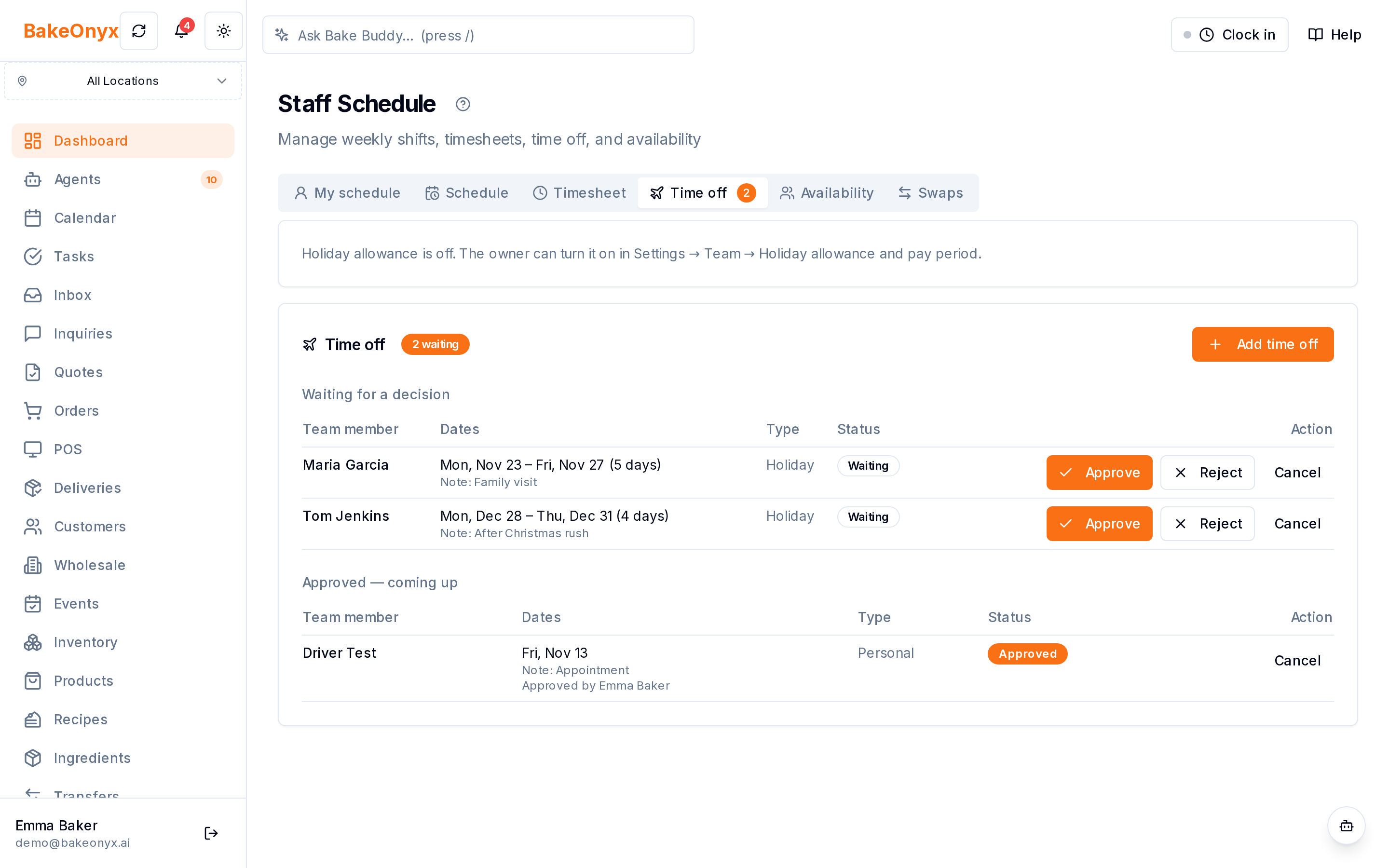
Your team member opens BakeOnyx on their phone and navigates to the holiday request section. They select their desired dates, add an optional note ("visiting family" or "dentist appointment"), and submit. The request lands in a queue visible to you and other managers—nothing gets lost in a text thread.
Step 2: Manager Reviews the Request
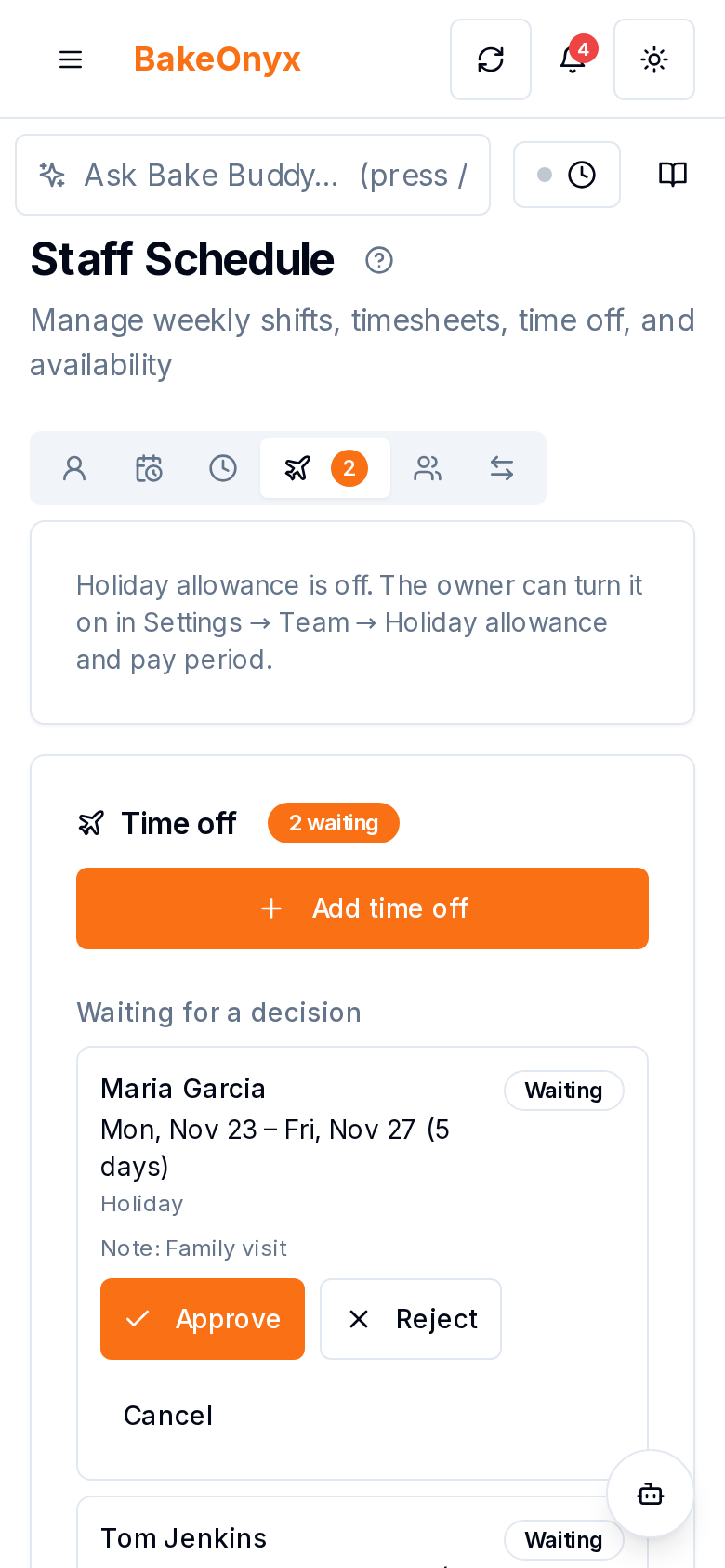
You receive the request in BakeOnyx. You can see at a glance:
- Who is requesting time off
- The exact dates
- How much holiday allowance they will have left after approval (when holiday allowance is turned on)
This transparency means you can make an informed decision in seconds, not hours.
Step 3: Manager Approves or Denies in One Tap
If the dates work, you tap "Approve." If there's a conflict, you tap "Reject" and can add a brief note explaining why (e.g., "Too many staff off that week; can we try another time?"). The decision is recorded, and your team member gets an email with your decision and note.
Step 4: Rota and Holiday Allowance Update Automatically
Once approved, two things happen without any manual work from you:
- Your rota automatically reflects the time off, so you see the shift gaps and can plan coverage
- Your holiday allowance records deduct the approved days from that employee's balance
No spreadsheets to update. No risk of forgetting to mark someone as "away." No confusion about who has days left.
Real Problems This Solves
Lost Requests
Holiday requests no longer disappear into text message threads or Slack channels. Every request is logged, timestamped, and visible in one place. You have a clear audit trail.
Double-Booking
Approved time off shows on the schedule, so before you approve a new request you can check who else is already off that week. You catch conflicts before they happen, not when two bakers show up expecting time off on the same Saturday.
Allowance Confusion
Your team no longer has to guess how many days they have left. The system shows them. You have an accurate record. When December rolls around, there are no surprises.
Admin Time
Approving requests used to mean updating your rota by hand, adjusting a spreadsheet, and sending a confirmation text. Now it's one tap, and everything syncs automatically.
Why This Matters for Bakery Owners
Staff scheduling is one of the biggest operational headaches in a bakery. Holiday requests are a key part of that puzzle. When they're handled informally—via text, email, or word-of-mouth—they create blind spots and friction.
BakeOnyx's Staff Holiday Requests feature brings order to the chaos. Your team gets a clear, fair process for requesting time off. You get visibility and control. Your rota stays accurate. Your holiday records stay honest.
The result: less time managing requests, fewer scheduling conflicts, and a team that feels heard because their requests are tracked and handled fairly.
Start Managing Holiday Requests Clearly
If your bakery is still managing time-off requests via text or spreadsheet, you're spending time you don't have on a problem BakeOnyx solves in seconds.
Try BakeOnyx free for 14 days and see how Staff Holiday Requests can simplify your scheduling. No credit card required.
The summary, FAQ, and statistics in this section were compiled from public sources and reviewed by the BakeOnyx editorial team. AI-assisted research.
Frequently Asked Questions
Can my team request holidays from their phone?▾
Yes. Staff members submit holiday requests directly through BakeOnyx on their phone, selecting dates and adding optional notes. Requests are logged and visible to managers instantly.
What happens when I approve a request?▾
Once you approve, your rota automatically updates to show the time off, and the employee's holiday allowance is deducted. No manual spreadsheet updates needed.
Can I see how much holiday each person has left?▾
Yes, when holiday allowance is turned on. When you review a holiday request, you see how much allowance the person will have left after approval, or by how much it goes over.
What if two staff members request the same dates?▾
Approved time off shows on the schedule, so you can see who is already off that week before you approve another request. You can then approve one, reject the other with a note, or suggest other dates.
Do I have to use Staff Holiday Requests, or is it optional?▾
Holiday requests are part of the BakeOnyx Scale plan. Holiday allowance tracking is optional: the owner turns it on in Settings → Team → Holiday allowance and pay period.
BakeOnyx Team
Contributing writer at BakeOnyx. Covering bakery business management, recipe costing, and baking industry trends.
Related Posts
Boost Bakery Sales: Master Your Holiday Pre-Order Strategy
Unlock peak holiday sales by optimizing your bakery's pre-order strategy. Learn how to streamline processes, manage demand, and delight customers with essential tips.
Bakery Invoice Payment Reminders: Automate Cash Flow Tracking
Stop chasing late wholesale payments manually. BakeOnyx's Invoice Cash Flow & Payment Chasing feature tracks what's owed, predicts weekly cash arrival, and sends automatic payment reminders.
Bakery Staff Time Clock App: Clock In From Any Device
Stop chasing paper timesheets and manually adding hours. BakeOnyx Staff Time Clock lets your team clock in from any device, and calculates weekly pay automatically.
Related Product Guides
Explore Related Features
Ready to get your time back?
Join hundreds of baking businesses using BakeOnyx to manage orders, recipes, and inventory.
Start Your Free Trial