News Feed and Platform Announcements
Stay up to date with platform announcements, feature updates, maintenance notices, and tips.
News Feed and Platform Announcements
- How to access and read platform announcements from the BakeOnyx team
- Understanding different announcement types and what they mean for your bakery
- Staying informed about feature updates, maintenance notices, and important news
What Are Platform Announcements?
BakeOnyx regularly shares important information with your bakery team through our News Feed. These announcements keep you informed about:
- Feature Updates — New capabilities and tools added to the platform
- Maintenance Notices — Scheduled downtime or system changes that may affect your work
- News — General platform news and company updates
- Updates — Improvements to existing features you're already using
Announcements are tailored to your subscription plan and user role, so you only see information relevant to your bakery.
How to Access the News Feed
- Log in to your BakeOnyx dashboard
- Click the bell icon in the sidebar header to see your unread announcement count
- Click News from the main navigation menu to open the News Feed page
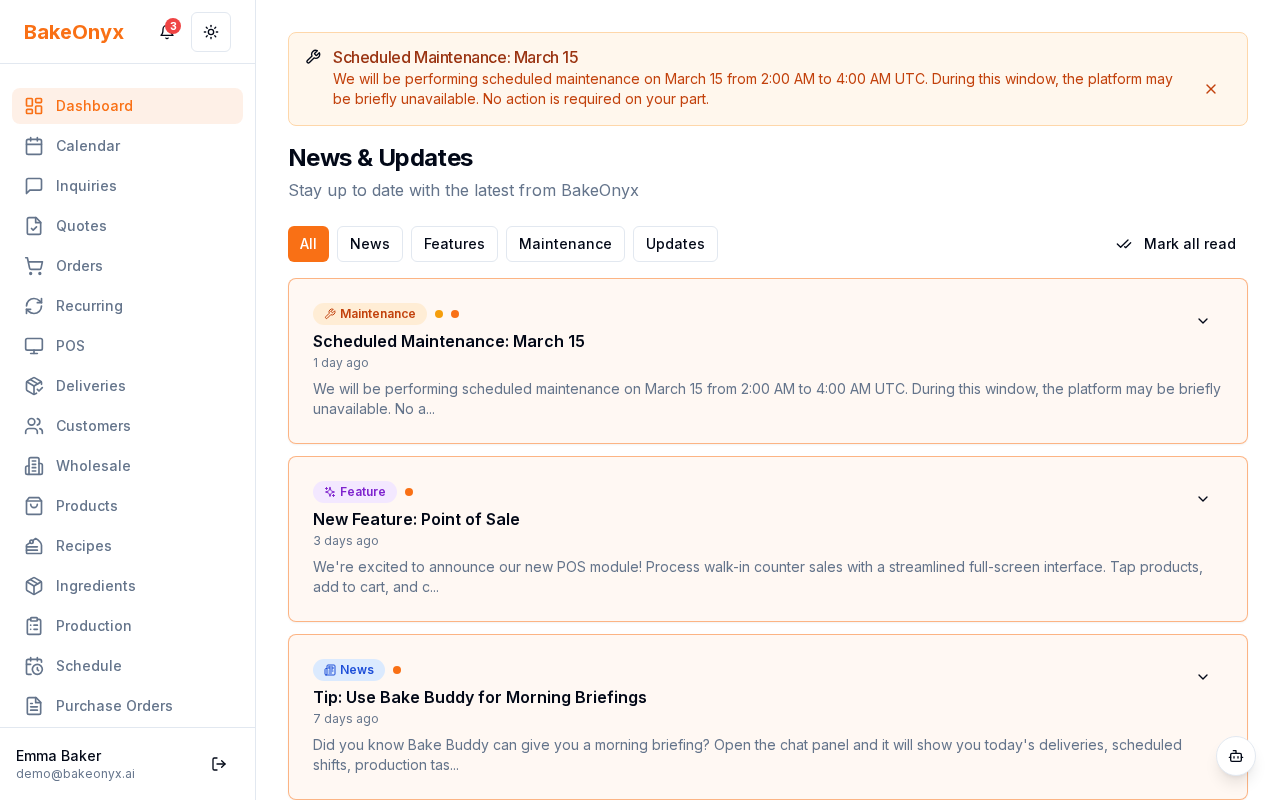
Understanding Announcements
Each announcement on the News Feed displays several key pieces of information:
- Title — A clear headline describing the announcement
- Type Badge — Indicates whether it's a feature update, maintenance notice, news, or update
- Priority Level — Shows how urgent or important the announcement is
- Content — The full details of the announcement
- Publish Date — When the announcement was posted
- Read Status — Indicates whether you've already read the announcement
Click on any announcement to read the full details and get more context about how it affects your bakery.
High-Priority Maintenance Announcements
When BakeOnyx schedules important maintenance or system changes, high-priority announcements appear as a banner at the top of your dashboard. These banners help ensure you don't miss critical information about downtime or major platform changes.
Up to three high-priority announcements may display at once. If you see a maintenance banner, we recommend reviewing it to understand any potential impact on your bakery's operations.
Staying on Top of Updates
To make sure you never miss important announcements:
- Check the bell icon in the sidebar regularly — it shows your unread announcement count
- Visit the News page at least once a week to stay current with platform changes
- Pay special attention to Maintenance Notices — these may affect when you can access BakeOnyx
- Share relevant announcements with your team, especially updates that impact their daily workflows
Announcement Targeting
BakeOnyx is smart about which announcements you see. The platform only shows announcements relevant to:
- Your current subscription plan (different tiers get different feature announcements)
- Your user role (managers may see different announcements than staff members)
- Your bakery's specific setup and configuration
This means you won't be overwhelmed with announcements that don't apply to your bakery.
Next Steps
Now that you understand how to stay informed about platform announcements, explore these related topics:
- Welcome to BakeOnyx — Get oriented with the platform basics
- Understanding Subscription Plans — Learn about different plan tiers and what features they include