Bakery Purchase Order System: Track Supplier Orders & Costs
BakeOnyx Purchase Orders lets you create supplier orders, receive stock, and automatically update ingredient costs—eliminating manual tracking and ordering mistakes.
Quick answer
BakeOnyx Purchase Orders lets bakery owners create supplier orders, receive stock, and automatically update ingredient costs and inventory—eliminating manual tracking, ordering gaps, and cost blindness.
Bakery Purchase Order System: Track Supplier Orders & Costs
The Problem: Manual Ordering Leaves Bakeries Vulnerable
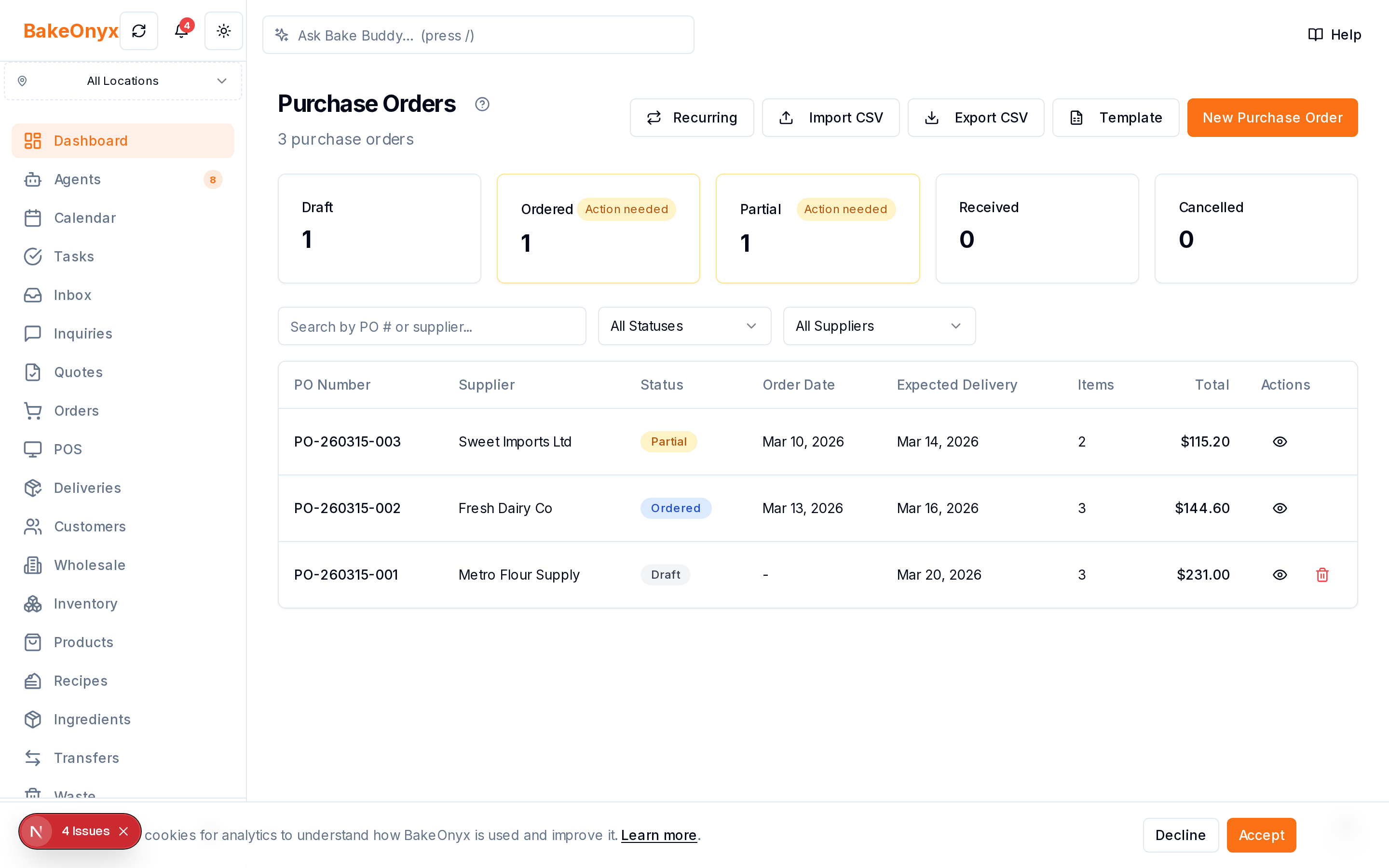
Running a bakery means juggling dozens of supplier relationships and ingredient needs. Most bakery owners rely on memory, spreadsheets, or scattered notes to remember what to order and when. When a delivery arrives, updating stock levels and ingredient costs often happens manually—if it happens at all. This creates a cascade of problems:
- Ordering gaps. You forget to order a key item, and production halts mid-week.
- Cost blindness. You don't know if your supplier raised prices last month because the invoice sits in a pile.
- Stock confusion. A delivery arrives, but your inventory system still shows old quantities, leading to over-ordering or waste.
- No supplier history. When it's time to negotiate or switch suppliers, you have no record of what you've paid over time.
These inefficiencies cost time, money, and peace of mind. BakeOnyx's Purchase Orders feature solves this by automating the entire order-to-receipt workflow.
How Purchase Orders Work in BakeOnyx
Step 1: Create a Purchase Order for Your Supplier
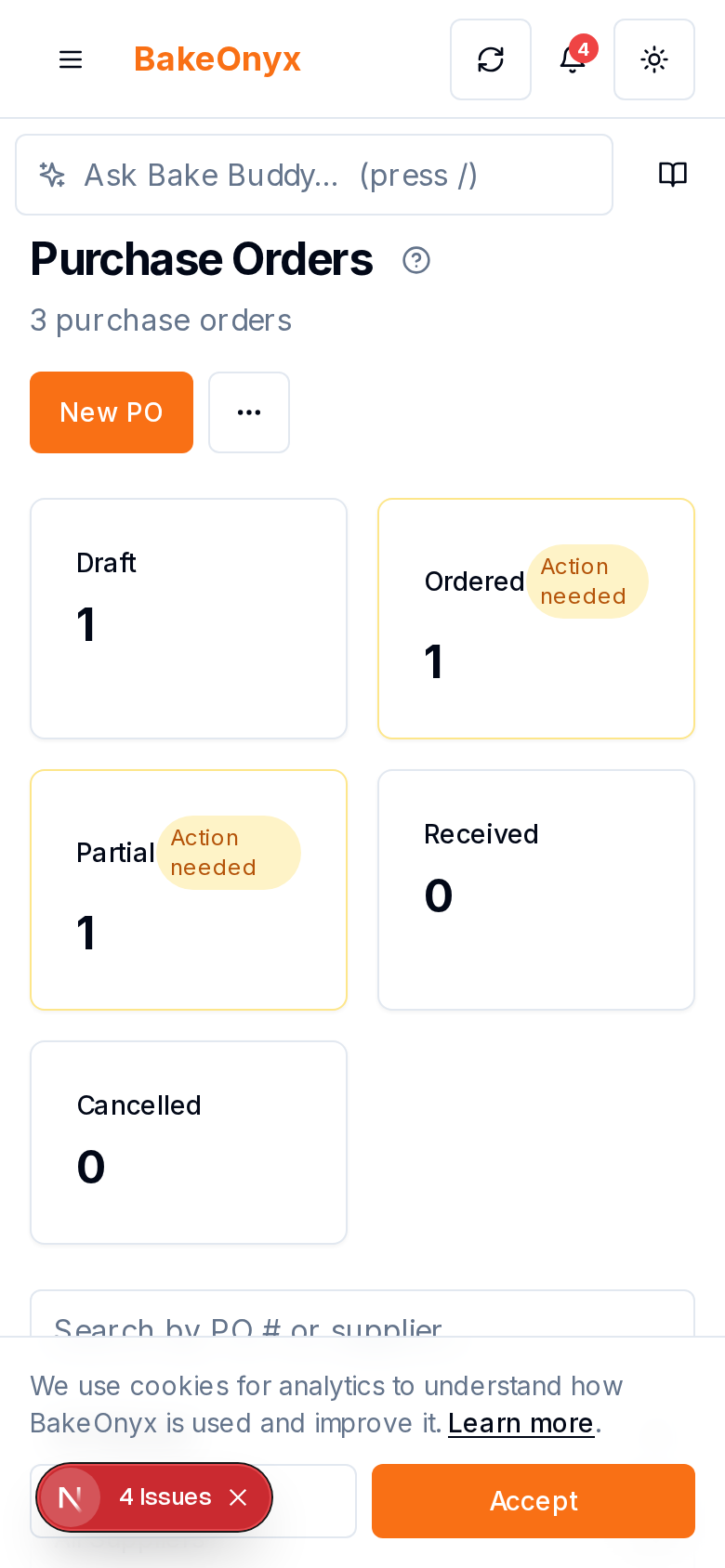
Instead of calling or emailing a supplier from memory, you build a purchase order (PO) directly in BakeOnyx. Select the supplier, add the ingredients you need with quantities, and the system shows you the current cost per unit. You can review the total order value before sending it—no surprises.
Step 2: Send or Log the Order
Once your PO is ready, you send it to your supplier via email or note it in the system as placed. BakeOnyx keeps a timestamped record of every order, so you always know what you've requested and when.
Step 3: Receive Stock Against the Purchase Order
When the delivery arrives, instead of manually typing quantities into your inventory, you receive items directly against the PO in BakeOnyx. Scan or enter each ingredient's quantity as it comes off the truck. The system matches it to what you ordered, flagging any discrepancies (e.g., you ordered 10 bags of flour but received 9).
Step 4: Stock Levels Update Automatically
As you receive each item, your ingredient inventory updates in real time. You no longer have a gap between when stock physically arrives and when your system reflects it. This means your production planning, recipe costing, and low-stock alerts all work with current data.
Step 5: Costs Stay Current
When you receive stock, BakeOnyx captures the actual cost from the invoice (or uses the PO cost if they match). Over time, this builds a complete cost history for every ingredient from every supplier. You can see at a glance whether flour prices have crept up or if one supplier consistently undercuts another.
Why This Matters for Your Bakery
Eliminates ordering mistakes. A structured PO process means fewer forgotten items and no more guessing about quantities.
Real-time inventory accuracy. Stock updates the moment you receive it, so your production team and management always see the true picture.
Cost transparency. A historical record of supplier pricing helps you negotiate better rates, spot trends, and make smarter sourcing decisions.
Audit trail. Every order, receipt, and cost change is logged. If there's ever a discrepancy with a supplier invoice or a question about what you paid, the record is there.
Saves admin time. No more manual spreadsheet updates or phone tag with suppliers. The workflow is in one place.
Who Benefits Most
Bakeries of any size benefit from Purchase Orders, but they're especially valuable if you:
- Work with multiple suppliers and struggle to keep orders organized.
- Have high ingredient turnover and need accurate, up-to-date stock levels.
- Want to analyze supplier performance and negotiate better pricing.
- Have a small team and need to cut down on administrative overhead.
Getting Started with BakeOnyx Purchase Orders
The feature is designed to fit naturally into your workflow. You don't need to overhaul how you work with suppliers—you just move your ordering and receiving into BakeOnyx, where it integrates with your inventory and cost tracking.
If you're tired of managing orders in email, spreadsheets, or your head, BakeOnyx's Purchase Orders feature is built to bring order to that chaos. Start a free trial today to see how it works for your bakery.
The summary, FAQ, and statistics in this section were compiled from public sources and reviewed by the BakeOnyx editorial team. AI-assisted research.
Frequently Asked Questions
Can I use Purchase Orders with multiple suppliers?▾
Yes. BakeOnyx Purchase Orders is built to work with as many suppliers as you have. You create a separate PO for each supplier, and the system tracks orders, costs, and history for all of them in one place.
What happens if a delivery doesn't match my purchase order?▾
When you receive stock in BakeOnyx, the system compares what arrived against what you ordered. If quantities don't match (e.g., you ordered 10 units but received 9), the discrepancy is flagged so you can follow up with the supplier.
Does BakeOnyx track how supplier prices change over time?▾
Yes. Every time you receive an order, BakeOnyx records the actual cost per unit. Over time, this builds a complete history of what each supplier has charged, helping you spot price trends and make informed sourcing decisions.
Do I have to email my supplier from BakeOnyx, or can I use my own method?▾
You can do either. You can send the PO directly from BakeOnyx, or you can log the order in the system and send it to your supplier however you normally do. The key is that BakeOnyx keeps the record and tracks receipt.
How does receiving stock in BakeOnyx update my inventory?▾
When you receive items against a PO, you enter the quantities received in BakeOnyx. The system automatically updates your ingredient stock levels in real time, so your inventory and cost data are always current.
BakeOnyx Team
Contributing writer at BakeOnyx. Covering bakery business management, recipe costing, and baking industry trends.
Related Posts
Multi-Location Bakery Inventory Transfers: Keep Stock Accurate
Move stock between bakery locations with a complete audit trail. BakeOnyx Inventory Transfers eliminate guesswork and keep every site's counts accurate.
Unified Inbox: Reply to All Customer Messages in One Place
Stop switching between email, WhatsApp, and social DMs. BakeOnyx's Unified Inbox lets you read and reply to every customer message in one place—with order history right there.
BakeOnyx Tasks: Keep Your Team Aligned on Busy Bake Days
Stop losing track of who's doing what during the morning rush. BakeOnyx Tasks keeps your whole team's to-dos in one shared list so nothing gets forgotten between shifts.
Related Product Guides
Explore Related Features
Ready to get your time back?
Join hundreds of baking businesses using BakeOnyx to manage orders, recipes, and inventory.
Start Your Free Trial