Bakery Order Management Software That Stops Lost Orders
Stop juggling texts, sticky notes, and spreadsheets. BakeOnyx Order Management keeps every order—from inquiry to delivery—in one organized place.
Quick answer
BakeOnyx Order Management centralizes every bakery order—from inquiry to delivery—in one organized dashboard, eliminating lost sticky notes, missed pickup dates, and double-booked schedules while preserving customer preferences for repeat business.
Bakery Order Management Software That Stops Lost Orders
Your phone buzzes. A text from a regular customer asking about a custom cake. You reply, then switch to Instagram where someone DMs about cupcake flavors. Meanwhile, your paper order diary sits on the counter, and three orders are scattered across a shared Google Sheet. By Friday, you're not sure which orders are due today, which client wanted fondant versus buttercream, and whether that Saturday wedding cake is really confirmed.
This is the reality for many bakery owners: orders live everywhere except in one place where you can actually manage them.
The Problem: Orders Scattered Across Every Channel
When orders arrive through texts, DMs, phone calls, email, and in-person visits, they don't automatically sync to a central record. You end up:
- Forgetting pickup dates because the order reminder is buried in an old text thread
- Missing customization details ("no nuts," "dairy-free," "gold leaf on top") because you scribbled them on a napkin
- Double-booking your oven or delivery schedule because you can't see at a glance what's due when
- Spending hours searching for a customer's phone number, address, or flavor preferences across multiple apps
- Losing repeat business when you forget what Mrs. Chen ordered last time or that Mr. Rodriguez always wants extra sprinkles
The result: stress, missed deadlines, unhappy customers, and revenue left on the table.
How BakeOnyx Order Management Solves This
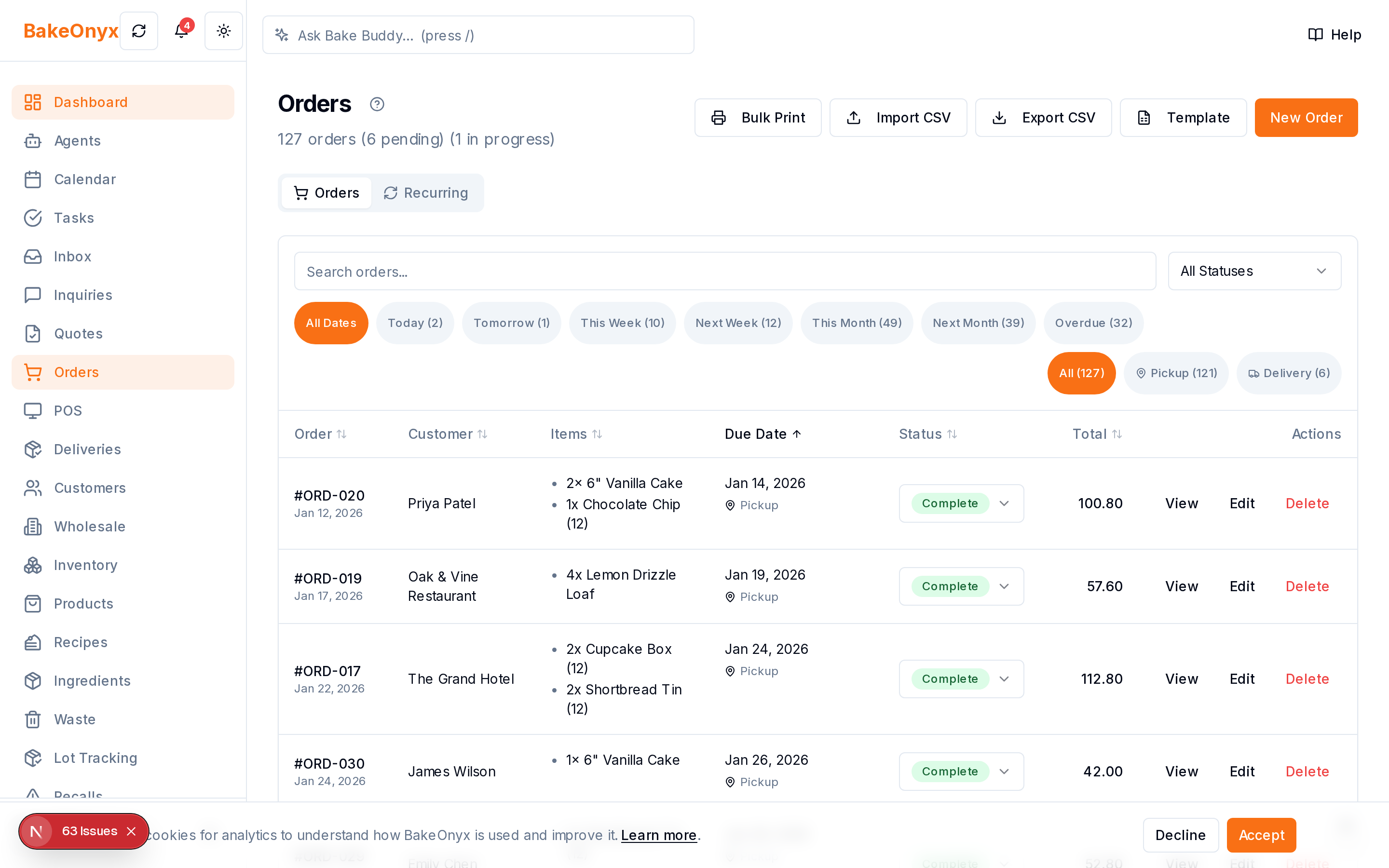
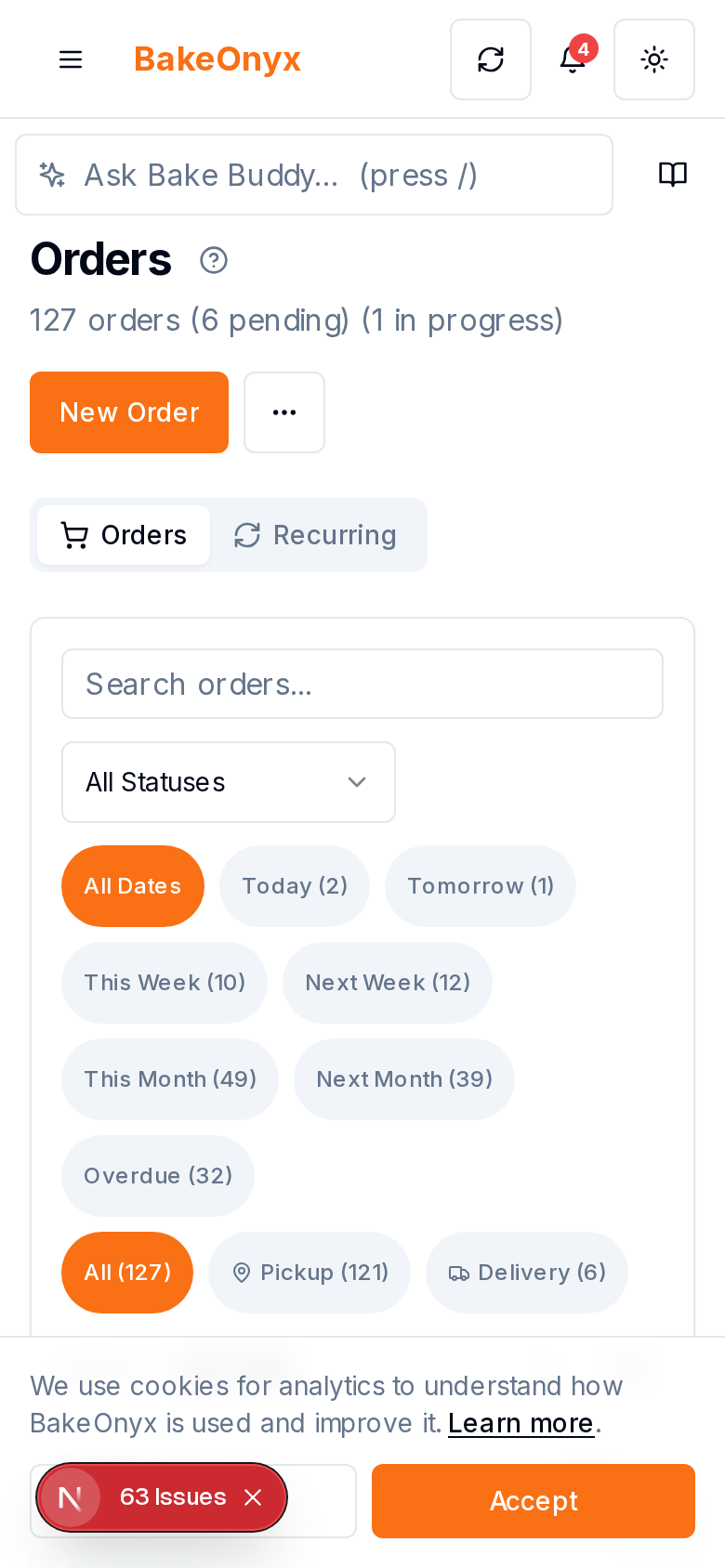
BakeOnyx Order Management gives you a single, organized dashboard where every order lives—whether it arrives by phone, email, text, or walk-in. You can see what's due today, this week, and beyond. You can store customer preferences, special requests, and delivery instructions in one record. And you can update order status in real time, so nothing falls through the cracks.
How It Works
Step 1: Create or Log a New Order
When a customer places an order—via any channel—you enter it into BakeOnyx in seconds. You record the customer name, contact information, order date, and due date. The system organizes it alongside all your other orders, so nothing gets lost in a text thread or sticky note.
Step 2: Add Order Details and Custom Requests
Capture everything that makes the order unique: flavor choices, dietary restrictions, decoration preferences, delivery address, and special instructions. BakeOnyx keeps all these details attached to the order record, so when it's time to bake, you have the full picture without hunting through old messages.
Step 3: View Your Order Schedule at a Glance
Open your BakeOnyx dashboard and see every order organized by due date. You instantly know what's due today, what's coming this week, and what's already delivered. No more guessing or flipping between a paper diary and a spreadsheet. This single view helps you plan your baking schedule, manage your oven time, and avoid double-booking.
Step 4: Update Order Status as You Work
As you bake, pack, and prepare orders for pickup or delivery, update the status in BakeOnyx. Mark orders as "in progress," "ready for pickup," or "delivered." This keeps you and your team on the same page, and it signals to customers (if you share access) that their order is on track.
Step 5: Store Customer Preferences for Next Time
BakeOnyx remembers what each customer ordered, their flavor preferences, any allergies or restrictions, and how they like to be contacted. The next time they place an order, you already have their history and preferences loaded. This saves time and shows customers you care about their details.
Why This Matters for Your Bottom Line
You save time. No more searching through messages or flipping between apps. One login, one view, everything you need.
You avoid costly mistakes. Missed pickup dates, forgotten customizations, and double-booked schedules hurt your reputation and your wallet. A centralized order system catches these before they become problems.
You build customer loyalty. When you remember that a repeat customer always wants dairy-free options or prefers afternoon pickups, they notice. That attention to detail keeps them coming back.
You scale without chaos. As your bakery grows and orders multiply, a system beats sticky notes every time. You can handle more orders without more stress.
A Realistic Example
Let's say you get a text from a customer asking about a custom birthday cake for next Saturday. You:
- Open BakeOnyx and create a new order with her name, phone, and email.
- Log the due date (Saturday) and add details: vanilla cake, chocolate ganache, "Happy 40th Birthday" in gold lettering, dairy-free.
- Note her delivery address and preferred pickup time (4 p.m.).
- Save.
On Friday, you glance at your dashboard and see the order is due tomorrow. You confirm the details are all there, bake with confidence, and deliver on time. The customer is happy. She leaves a review and refers a friend.
Without BakeOnyx, that order might have been a text you almost forgot, or a detail you missed, or a delivery time you got wrong.
Get Started
If you're managing orders across texts, sticky notes, and spreadsheets, BakeOnyx Order Management can bring them all into one organized place. Try it free—no credit card required—and see how much clearer your order schedule becomes.
Ready to stop losing orders to scattered notes and forgotten dates? Start your free BakeOnyx trial today.
The summary, FAQ, and statistics in this section were compiled from public sources and reviewed by the BakeOnyx editorial team. AI-assisted research.
Frequently Asked Questions
Can I see all my orders due this week in one view?▾
Yes. BakeOnyx Order Management displays your orders organized by due date, so you can instantly see what's due today, this week, and beyond. No more flipping between a diary and a spreadsheet.
Where do orders come from? Do they auto-import from my website or social media?▾
Orders are entered into BakeOnyx manually when they arrive—whether by phone, text, email, or in-person. The feature consolidates all these orders into one place so you have a single source of truth, even if customers contact you through different channels.
Can I store customer preferences and special requests?▾
Yes. BakeOnyx stores all order details—flavor choices, dietary restrictions, decoration preferences, delivery instructions, and customer contact info—attached to each order record. This makes it easy to remember what repeat customers want and avoid mistakes.
Can my team see and update orders?▾
BakeOnyx Order Management lets you organize and track orders in one system. Check with your BakeOnyx plan to see team collaboration and access features.
Will this help me stop double-booking my oven or delivery schedule?▾
Yes. By viewing all orders organized by due date in one dashboard, you can instantly see what's scheduled when and avoid overbooking your baking or delivery time.
BakeOnyx Team
Contributing writer at BakeOnyx. Covering bakery business management, recipe costing, and baking industry trends.
Related Posts
Unified Inbox: Reply to All Customer Messages in One Place
Stop switching between email, WhatsApp, and social DMs. BakeOnyx's Unified Inbox lets you read and reply to every customer message in one place—with order history right there.
Bakery Quote Software: Build & Accept Quotes Online
Stop typing quotes in Word. BakeOnyx's Quotes feature lets you build polished, itemised quotes, send them online, and convert accepted quotes into orders instantly.
Bakery Order Calendar: Never Double-Book Orders Again
See every order, pickup, and delivery on one colour-coded calendar. BakeOnyx's Order Calendar eliminates scheduling conflicts and gives you a clear month-at-a-glance view of your workload.
Related Product Guides
Explore Related Features
Ready to get your time back?
Join hundreds of baking businesses using BakeOnyx to manage orders, recipes, and inventory.
Start Your Free Trial