Unified Inbox: Reply to All Customer Messages in One Place
Stop switching between email, WhatsApp, and social DMs. BakeOnyx's Unified Inbox lets you read and reply to every customer message in one place—with order history right there.
Quick answer
BakeOnyx's Unified Inbox consolidates customer messages from email, WhatsApp, and social media into a single dashboard, displaying order history alongside each conversation so bakers can reply faster and accurately without switching apps.
Unified Inbox: Reply to All Customer Messages in One Place
The Problem: Messages Scattered Everywhere
Your phone buzzes. A customer has messaged you on WhatsApp about their wedding cake order. You switch apps. Then an email arrives asking about custom cookie sizes. You flip to Gmail. Meanwhile, someone comments on your Instagram about a birthday order inquiry.
By the time you've checked all three channels, you've lost 15 minutes. Worse, you're answering "What's in your order?" without actually knowing—you have to hunt through your records, ask the customer to repeat details, or risk giving conflicting information.
This fragmentation is exhausting. Messages get lost between apps. Important inquiries slip through the cracks. And every time you switch contexts, you lose momentum and risk making mistakes.
The Solution: One Inbox for Every Channel
BakeOnyx's Unified Inbox brings every customer message into a single, searchable view. Email, WhatsApp, social media DMs—they all land in one place. No app-switching. No lost threads.
But here's what makes it different: beside each conversation, you see the customer's order history. Their past orders. Their preferences. Their contact details. Everything you need to give great service, instantly.
This means faster replies, fewer mistakes, and happier customers.
How It Works
Step 1: Connect Your Messaging Channels
Start by linking the channels where customers contact you. In BakeOnyx, you authorize email, WhatsApp, and social media accounts to feed into your Unified Inbox. Once connected, all incoming messages route to one dashboard—no manual forwarding or copying needed.
Step 2: View All Messages in Chronological Order
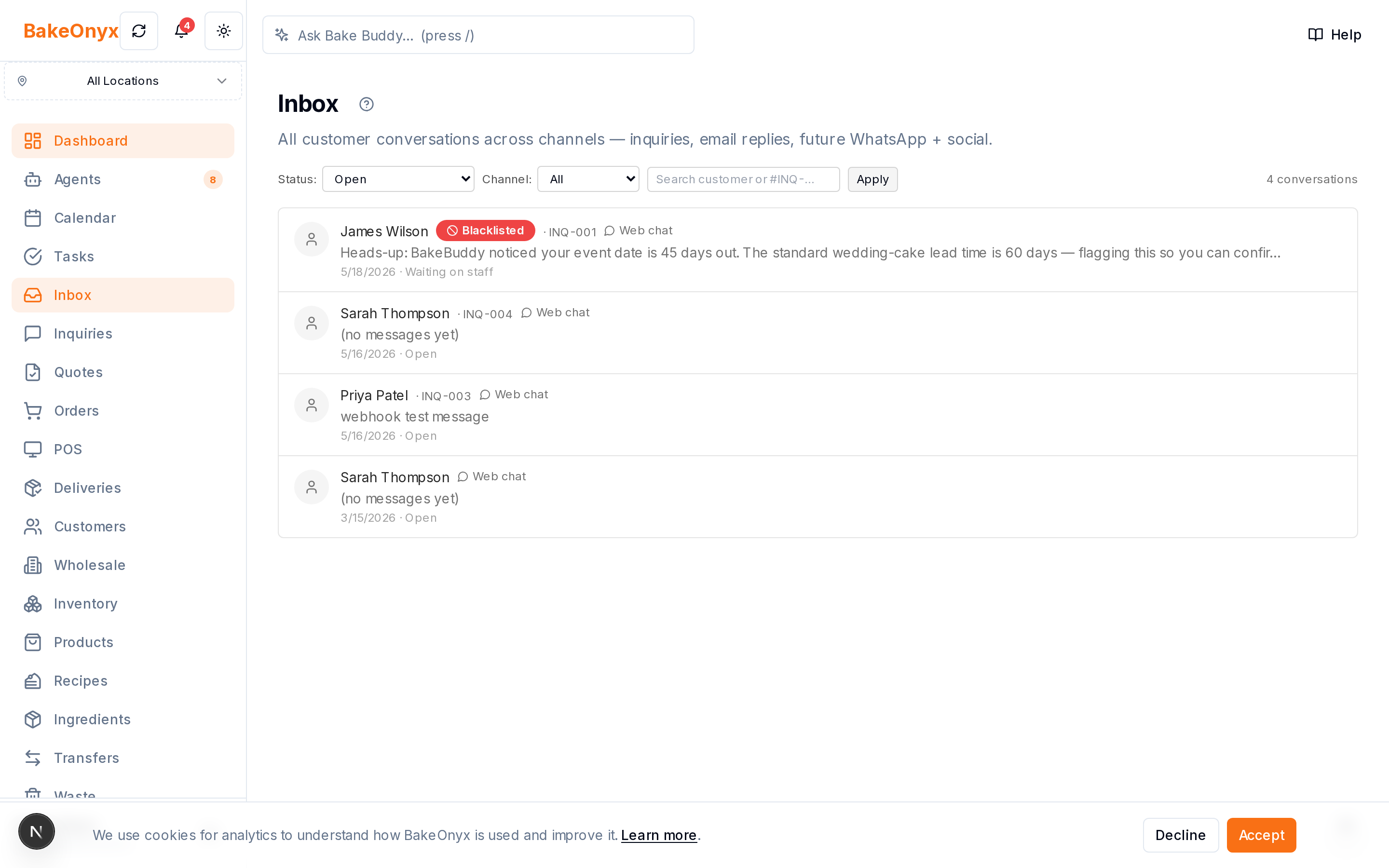
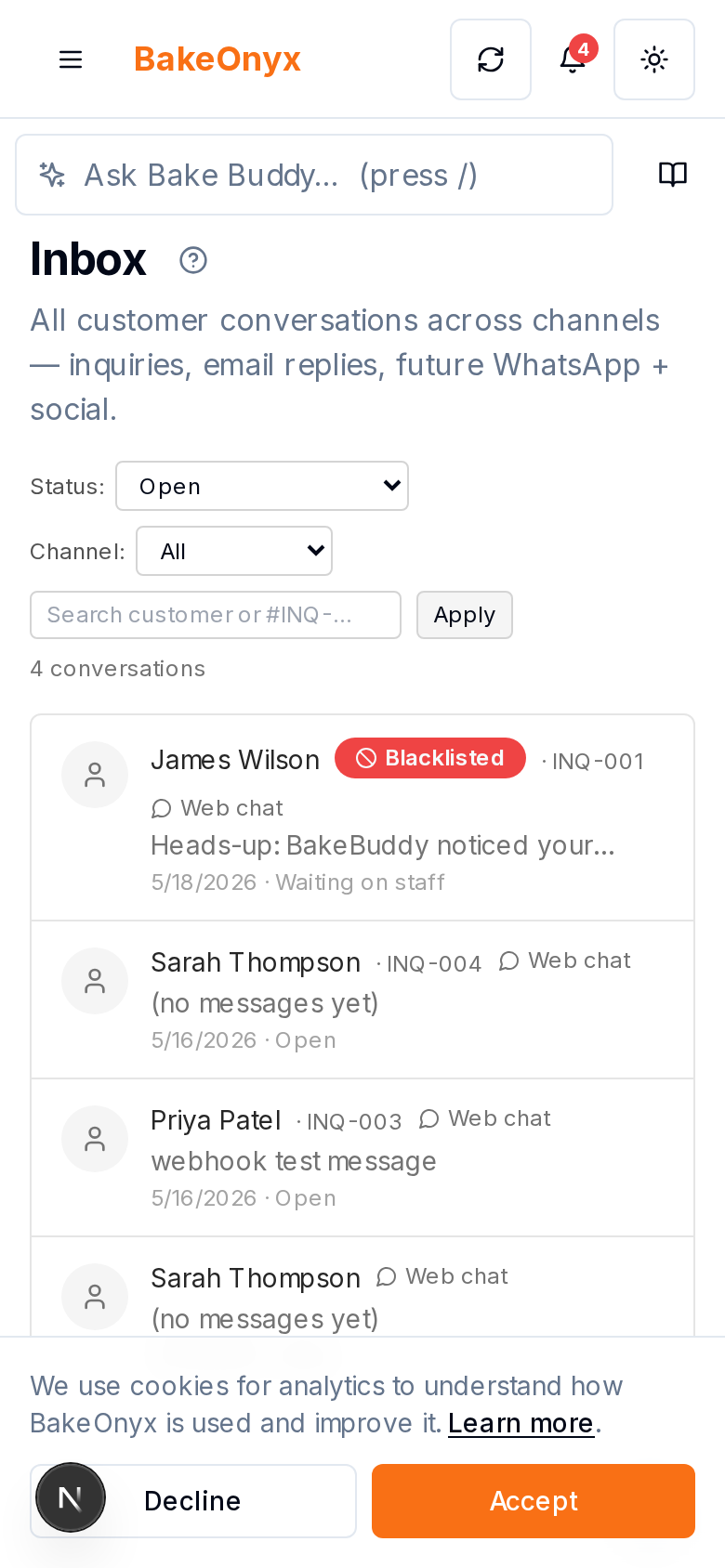
Open your Unified Inbox. Every new message appears in a single, chronological feed. You see the customer's name, the channel they used (email icon, WhatsApp icon, etc.), and a preview of their message. Scan through, prioritize, and respond—all without leaving the inbox.
Step 3: Open a Conversation and See Order Context
Click on any message to open the full conversation. On one side, you see the chat thread. On the other side, BakeOnyx displays the customer's order history: past orders, order dates, items purchased, special requests, and delivery addresses. You now have everything you need to answer accurately.
Step 4: Reply Directly from the Inbox
Type your response in the message field. BakeOnyx sends it back through the same channel the customer used—if they messaged via WhatsApp, your reply goes to WhatsApp; if via email, it goes to email. The customer sees your response in their preferred channel. The conversation stays linked in your Unified Inbox for future reference.
Step 5: Search and Organize Across All Channels
Need to find a message from last week? Search by customer name, order number, or keyword. BakeOnyx searches across all channels at once. You can also flag important conversations or mark them as resolved, keeping your inbox organized as your business grows.
Why This Saves Time and Money
Faster Response Times: No hunting through three apps to find a customer's message. Reply in seconds.
Fewer Mistakes: Order context is right there. You won't accidentally confirm a flavor they didn't order or miss a dietary restriction.
Better Customer Experience: Customers feel heard when you respond quickly and remember their preferences. This builds loyalty and encourages repeat orders.
Less Mental Load: Your team doesn't have to remember which channel to check or keep multiple apps open. One inbox, one workflow.
Real-World Example
Sarah runs a small custom cake business. She used to check email, WhatsApp, and Instagram DMs separately. A customer once messaged on WhatsApp asking if they could change their order, but Sarah missed it for three hours because she was focused on email. By then, the customer was frustrated.
With BakeOnyx's Unified Inbox, Sarah sees all messages in one place. When a customer messages about a change, she spots it immediately, opens the conversation, sees their original order details, and confirms the change in seconds—all without leaving the inbox. The customer gets a fast, accurate response and feels valued.
Get Started
If your bakery operates across multiple messaging channels, the Unified Inbox is a game-changer. You'll spend less time managing messages and more time baking—and your customers will notice the difference.
Ready to streamline your customer communication? Start a free trial of BakeOnyx and see how the Unified Inbox works for your bakery.
The summary, FAQ, and statistics in this section were compiled from public sources and reviewed by the BakeOnyx editorial team. AI-assisted research.
Frequently Asked Questions
Does the Unified Inbox work with all messaging platforms?▾
BakeOnyx's Unified Inbox supports email, WhatsApp, and social media DMs. If your bakery uses other channels, check with BakeOnyx support about current integrations and planned additions.
Can multiple team members access the Unified Inbox?▾
Yes. Team members can view and reply to messages from the shared Unified Inbox, so your whole team stays on the same page and no message gets missed.
What order information appears in the Unified Inbox?▾
When you open a customer conversation, you see their order history, past orders, order dates, items purchased, special requests, and delivery addresses—everything needed to provide accurate, personalized service.
If I reply from the Unified Inbox, does the customer see it in their original channel?▾
Yes. If a customer messaged via WhatsApp, your reply goes to WhatsApp; if via email, it goes to email. The response reaches them in the channel they used to contact you.
Can I search across all channels at once?▾
Yes. The Unified Inbox includes a search feature that looks across all connected channels by customer name, order number, or keyword, making it easy to find past conversations.
BakeOnyx Team
Contributing writer at BakeOnyx. Covering bakery business management, recipe costing, and baking industry trends.
Related Posts
Multi-Location Bakery Inventory Transfers: Keep Stock Accurate
Move stock between bakery locations with a complete audit trail. BakeOnyx Inventory Transfers eliminate guesswork and keep every site's counts accurate.
BakeOnyx Tasks: Keep Your Team Aligned on Busy Bake Days
Stop losing track of who's doing what during the morning rush. BakeOnyx Tasks keeps your whole team's to-dos in one shared list so nothing gets forgotten between shifts.
Wholesale Portal: Self-Service Ordering for Café & Shop Clients
Stop managing wholesale orders via text and email. BakeOnyx's Wholesale Portal lets your café and shop customers place repeat orders themselves at agreed prices—no re-keying, no mistakes.
Related Product Guides
Explore Related Features
Ready to get your time back?
Join hundreds of baking businesses using BakeOnyx to manage orders, recipes, and inventory.
Start Your Free Trial