Bakery Quote Software: Build & Accept Quotes Online
Stop typing quotes in Word. BakeOnyx's Quotes feature lets you build polished, itemised quotes, send them online, and convert accepted quotes into orders instantly.
Quick answer
BakeOnyx's Quotes feature lets bakery owners build itemised quotes in minutes, send them for online acceptance, and convert accepted quotes into confirmed orders with a single click—eliminating manual typing and double-entry.
Stop Building Quotes in Word—Let BakeOnyx Do It
Every bakery owner knows the routine. A customer calls or emails asking for a price on a custom cake, a tiered wedding design, or a bulk order of decorated cookies. You open Word, type out the items, manually calculate totals, format it to look professional, and email it over. Then you wait—and wonder. Did they open it? Do they want to move forward? When they say yes, you have to type the whole thing again as an order.
That workflow costs time you don't have and creates blind spots you can't afford.
Bakery quote software exists to solve this. BakeOnyx's Quotes feature turns quote creation from a tedious, manual process into a few clicks—and it doesn't stop there. Once a customer accepts your quote online, you can convert it into a confirmed order instantly, with no re-entry required.
The Problem: Manual Quotes Are a Time Drain
Building quotes the old way has three major pain points:
1. Time spent typing. Whether you're quoting a wedding cake, a corporate order, or a seasonal special, you're starting from scratch each time. You list items, add quantities, calculate prices, apply discounts, and format it all to look professional. That's 15–30 minutes per quote—time you could spend baking or talking to customers.
2. No visibility into customer action. Once you email a quote, it vanishes into their inbox. You don't know if they've read it, when, or what they think. You follow up by guessing. Some customers say yes and forget to tell you. Others go silent. You're left chasing down confirmations.
3. Double-entry when they accept. When a customer finally says "yes, let's do it," you have to recreate that quote as an order in your system. You're typing the same items, quantities, and prices a second time. It's error-prone and wasteful.
For bakeries handling dozens of custom orders a month, this adds up to hours of wasted admin work.
How Quotes in BakeOnyx Solves This
Step 1: Build a Quote in Minutes
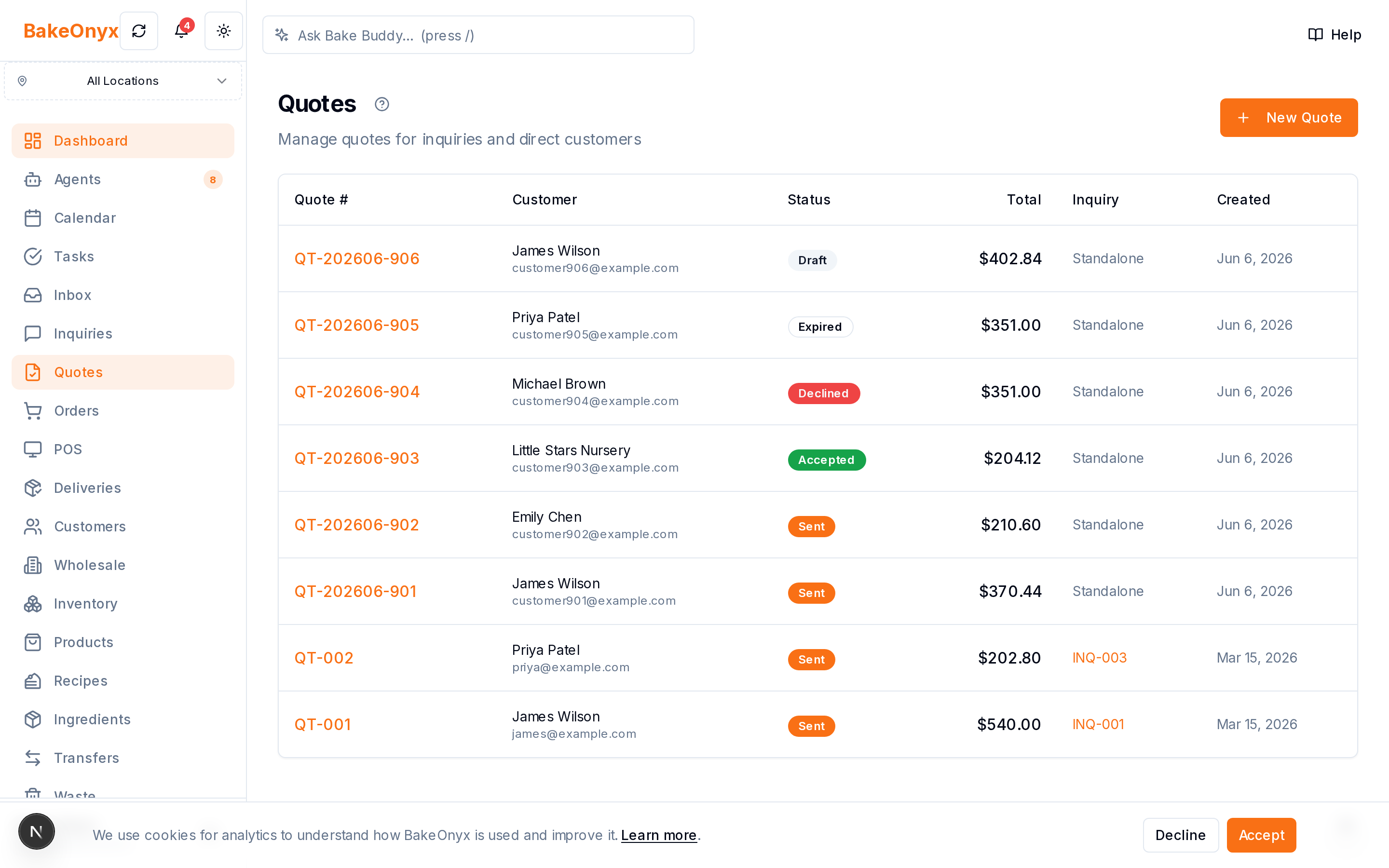
Instead of opening Word, you build your quote directly in BakeOnyx. You start by selecting items from your product catalog—cakes, boxes, decorations, custom labour, delivery fees, whatever you offer. Add quantities and prices for each line. BakeOnyx calculates subtotals and applies any discounts or taxes automatically. The quote is formatted and ready to send in minutes, not half an hour.
Step 2: Send It Online & Track Acceptance
Once your quote is ready, you send it to the customer via a link. They open it on their phone or computer and see a clean, professional quote with your branding. More importantly, BakeOnyx tracks whether they've opened it and when. You see their status in real time—pending, viewed, or accepted.
When they're ready, they click to accept the quote directly in BakeOnyx. No email back-and-forth. No ambiguity. You get a notification the moment they say yes.
Step 3: Convert the Quote Into an Order With One Click
Here's where BakeOnyx saves you the most time. Once a customer accepts your quote, you don't start over. You convert it into a confirmed order in a single click. All the items, quantities, prices, and customer details carry over automatically. Your quote becomes your order, and you can move straight to production planning and scheduling.
Why This Matters for Your Bakery
Faster turnaround. You spend less time on paperwork and more time on what you do best—baking. Quotes that used to take 30 minutes now take 5.
Fewer mistakes. No manual re-entry means no typos, no missed items, no pricing errors. What the customer accepted is exactly what you produce.
Better customer experience. Customers get a professional, branded quote they can review and accept on their own time. They feel heard and respected, not like they're chasing you for a price.
Real visibility. You know the moment a customer opens your quote and the moment they accept it. No more guessing or awkward follow-ups. You can plan your schedule with confidence.
A Real Workflow
Imagine a customer emails asking for a quote on a custom tiered wedding cake for 100 guests, with custom toppers and delivery. Here's how it works in BakeOnyx:
- You log into BakeOnyx and start a new quote.
- You add the cake tiers, custom toppers, delivery, and any other items.
- BakeOnyx calculates the total automatically.
- You send the quote link to the customer.
- They open it on their phone, review it, and click "Accept."
- You get a notification. You click "Convert to Order."
- The order is now in your system, ready for production scheduling.
Total admin time: under 10 minutes. Total customer confusion: zero.
Who Benefits Most
Bakeries that handle custom orders—weddings, corporate events, seasonal specials, bulk orders—see the biggest time savings. If you're sending more than a few quotes a month, BakeOnyx's Quotes feature pays for itself in recovered admin time alone.
Start Using BakeOnyx Quotes Today
If you're tired of building quotes in Word and chasing customers for confirmations, BakeOnyx's Quotes feature is designed for you. It's built into the platform, works seamlessly with your order management, and eliminates the friction between a customer inquiry and a confirmed order.
Ready to see how it works? Start a free trial of BakeOnyx and build your first quote in the next few minutes. No credit card required.
The summary, FAQ, and statistics in this section were compiled from public sources and reviewed by the BakeOnyx editorial team. AI-assisted research.
Frequently Asked Questions
Can I use my own product prices in BakeOnyx quotes?▾
Yes. BakeOnyx pulls prices from your product catalog, so every quote reflects your current pricing. You can also add custom line items or adjust prices on a per-quote basis if needed.
What happens if a customer doesn't accept the quote?▾
BakeOnyx tracks quote status, so you can see if it's been opened or remains pending. You can follow up manually or resend the quote link at any time. The quote stays in your system for your records.
Do I have to re-enter the quote as an order manually?▾
No. Once a customer accepts a quote in BakeOnyx, you convert it to an order with one click. All items, quantities, prices, and customer details carry over automatically—no re-typing required.
Can customers see my branding on the quote?▾
Yes. BakeOnyx quotes are formatted professionally and can include your bakery's branding, making a polished impression on customers.
Is there a limit to how many quotes I can send?▾
No. You can build and send as many quotes as you need. BakeOnyx is designed to handle high-volume quote workflows for busy bakeries.
BakeOnyx Team
Contributing writer at BakeOnyx. Covering bakery business management, recipe costing, and baking industry trends.
Related Posts
Unified Inbox: Reply to All Customer Messages in One Place
Stop switching between email, WhatsApp, and social DMs. BakeOnyx's Unified Inbox lets you read and reply to every customer message in one place—with order history right there.
BakeOnyx Tasks: Keep Your Team Aligned on Busy Bake Days
Stop losing track of who's doing what during the morning rush. BakeOnyx Tasks keeps your whole team's to-dos in one shared list so nothing gets forgotten between shifts.
Wholesale Portal: Self-Service Ordering for Café & Shop Clients
Stop managing wholesale orders via text and email. BakeOnyx's Wholesale Portal lets your café and shop customers place repeat orders themselves at agreed prices—no re-keying, no mistakes.
Related Product Guides
Explore Related Features
Ready to get your time back?
Join hundreds of baking businesses using BakeOnyx to manage orders, recipes, and inventory.
Start Your Free Trial