Bakery Order Calendar: Never Double-Book Orders Again
See every order, pickup, and delivery on one colour-coded calendar. BakeOnyx's Order Calendar eliminates scheduling conflicts and gives you a clear month-at-a-glance view of your workload.
Quick answer
BakeOnyx's Order Calendar displays every order, pickup, and delivery on a single colour-coded calendar, eliminating double-bookings and giving bakery owners a clear month-at-a-glance view of their workload and capacity.
Bakery Order Calendar: Never Double-Book Orders Again
Running a bakery means juggling dozens of moving pieces. Orders come in by phone, email, Instagram DM, and your website. Pickups are scattered across the week. Deliveries need coordinating. And somewhere in the middle, you're trying to remember if you already promised two wedding cakes for the same Saturday morning.
If you've ever double-booked an order, oversold your capacity, or missed a pickup date because it slipped your mind, you're not alone. Many bakery owners rely on paper diaries, sticky notes, or scattered spreadsheets to track their orders. The result? Stress, last-minute scrambling, and unhappy customers.
BakeOnyx's Order Calendar solves this by giving you one central, colour-coded view of every order, pickup, and delivery. No more juggling multiple systems. No more surprises on a busy Tuesday morning.
The Problem: Scattered Order Tracking Leads to Overbooking
Paper diaries work until they don't. A customer calls while you're elbow-deep in dough. You jot down "cake order—Saturday." Later, an email comes in for a Saturday delivery. You forget you already have two big orders that day. You say yes. Now you're scrambling to bake three custom cakes in 48 hours.
Or this: you check your phone calendar, but it doesn't show your Instagram orders. You glance at your order notebook, but it doesn't sync with your delivery schedule. Each system tells a different story, and you're left guessing whether you have capacity.
The cost of these mistakes is real. You might:
- Rush orders and disappoint customers with quality issues
- Miss pickup deadlines and damage your reputation
- Overcommit and burn out your team
- Lose revenue because you can't confidently take new orders
What you need is a single source of truth: one place where every order, every pickup date, and every delivery is visible at a glance.
How BakeOnyx's Order Calendar Works
Step 1: All Orders Appear Automatically on Your Calendar
When a customer places an order through BakeOnyx—whether via your website, phone, or email—it automatically populates on your Order Calendar. You don't have to manually enter it twice. The order shows up with the customer's name, what they ordered, and their requested pickup or delivery date.
Step 2: Colour-Code Orders by Type or Status
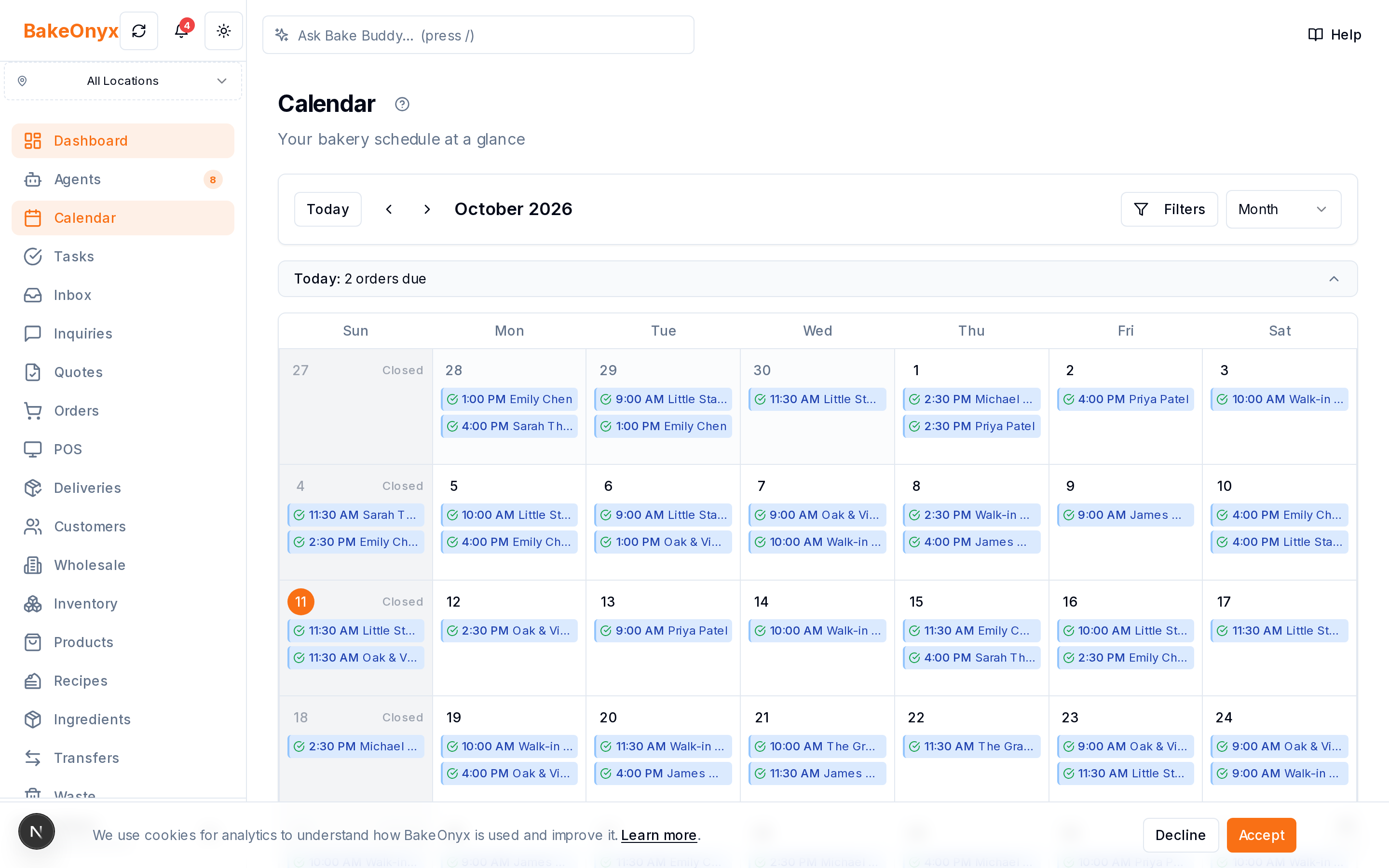
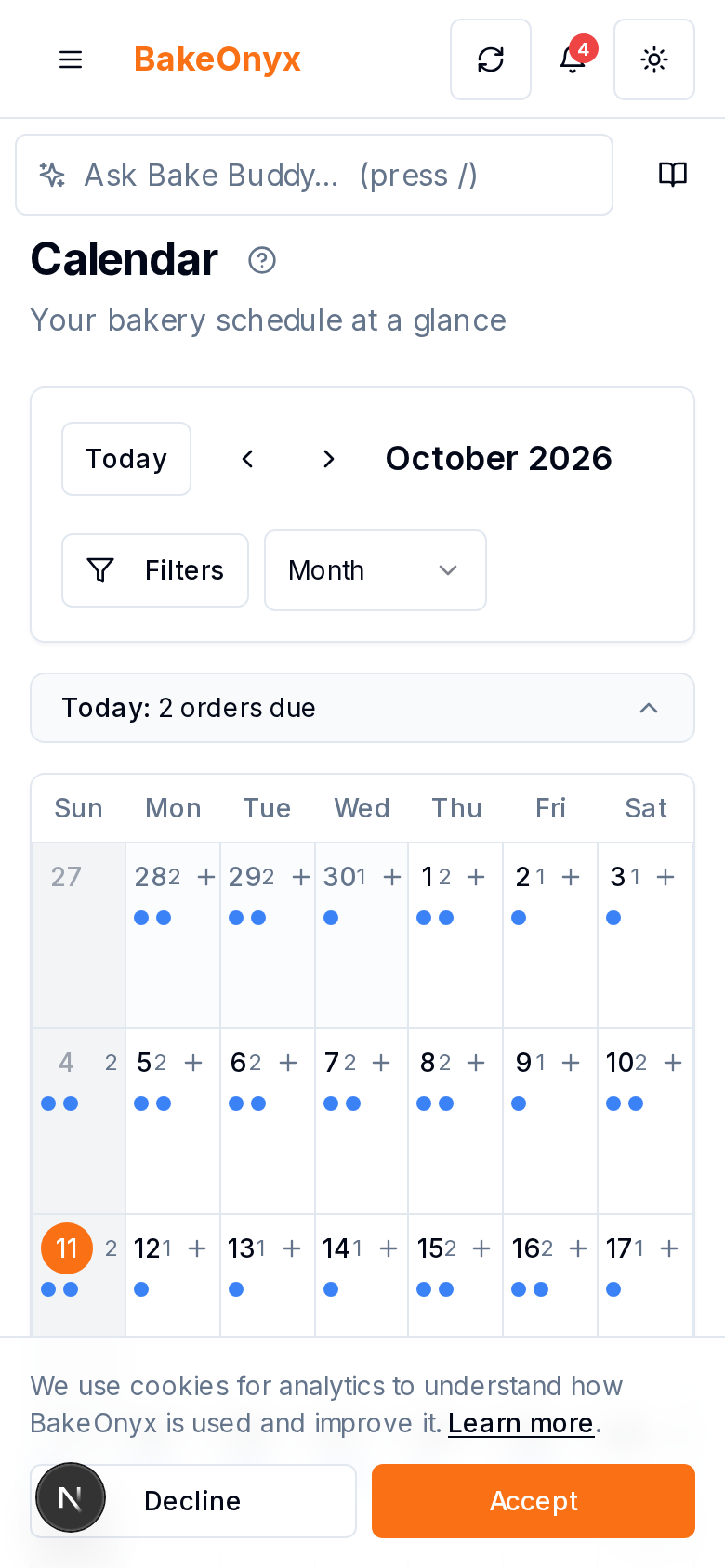
Each order appears as a colour-coded block on your calendar. You can customise the colours to match your workflow: one colour for pickups, another for deliveries, another for custom orders, or however it makes sense for your bakery. At a glance, you instantly know what kind of order you're looking at and when it's due.
Step 3: View Your Workload Month-at-a-Glance
Switch to month view and see your entire schedule laid out. This is where the real power kicks in. You can immediately spot busy days, quiet days, and potential conflicts. If you see three orders stacked on the same Saturday, you know you need to either decline new orders for that day or negotiate different pickup times with customers.
Step 4: Check Capacity Before Confirming New Orders
When a new customer calls or emails to place an order, open your Order Calendar and check your availability. Can you fit another cake on Thursday? Is your delivery schedule full on Friday? You'll know in seconds, so you can confidently say "yes" or offer an alternative date. No more overbooking.
Step 5: Sync Pickups and Deliveries with Your Team
Your team can also see the calendar (if you grant them access). This means your decorator knows which orders are coming up. Your delivery driver sees the day's route before they leave. Everyone's working from the same schedule, so nothing falls through the cracks.
Why This Matters for Your Bottom Line
A bakery order calendar isn't just about avoiding embarrassing double-bookings—though that's huge. It's about running a more efficient, predictable business.
When you know your capacity, you can:
- Take more orders confidently (because you know you won't overcommit)
- Plan your ingredients and labour more accurately
- Reduce last-minute stress and team burnout
- Deliver orders on time, every time, which builds customer loyalty
- Spot patterns (e.g., "Saturdays are always packed, Mondays are quiet") and adjust your pricing or marketing accordingly
A Simple Tool That Fits Your Workflow
You don't need a complicated project-management suite. You need to see your orders. BakeOnyx's Order Calendar is designed specifically for bakeries, so it speaks your language: pickup dates, delivery windows, custom requests, and seasonal rushes.
If you're currently managing orders across paper, email, and your phone's calendar, consolidating everything into one colour-coded view will save you hours every month—and give you peace of mind that no order is falling through the cracks.
Ready to Stop Juggling?
If double-booked orders or scheduling chaos is holding your bakery back, BakeOnyx's Order Calendar can help. Start with a free trial and see how a single, unified view of your orders changes the way you run your business. No credit card required.
The summary, FAQ, and statistics in this section were compiled from public sources and reviewed by the BakeOnyx editorial team. AI-assisted research.
Frequently Asked Questions
Can I see my orders from different sources (phone, email, website) on one calendar?▾
Yes. When orders are placed through BakeOnyx, they automatically appear on your Order Calendar regardless of the channel. This gives you one unified view instead of juggling multiple systems.
Can I customise the colours on the calendar?▾
Yes. You can colour-code orders by type (pickups vs. deliveries), status, or any other category that matches your workflow. This makes it easy to spot different order types at a glance.
Can my team see the calendar too?▾
Yes, you can grant your team access to the Order Calendar so everyone is working from the same schedule. This helps prevent miscommunications and ensures orders are fulfilled on time.
What happens if I try to book an order on a day that's already full?▾
The calendar shows you your existing orders, so you can see capacity before confirming a new order. You can then decide to decline, offer an alternative date, or adjust your schedule.
Does the calendar show both pickup and delivery dates?▾
Yes. The Order Calendar displays both pickups and deliveries, so you have a complete picture of all your commitments and can plan your workload accordingly.
BakeOnyx Team
Contributing writer at BakeOnyx. Covering bakery business management, recipe costing, and baking industry trends.
Related Posts
BakeOnyx Tasks: Keep Your Team Aligned on Busy Bake Days
Stop losing track of who's doing what during the morning rush. BakeOnyx Tasks keeps your whole team's to-dos in one shared list so nothing gets forgotten between shifts.
Bakery Product and Price Management: Keep Costs Honest
Stop managing prices across spreadsheets and memory. BakeOnyx's Products & Pricing feature links your full product list, variants, and prices to recipes so you always know your true costs.
Build Weekly Rotas in Minutes: BakeOnyx Staff Scheduling
Stop managing rotas in spreadsheets. BakeOnyx Staff Scheduling lets you drag-and-drop shifts, track availability, and see labour costs before you commit—cutting scheduling time and preventing understaffed days.
Related Product Guides
Explore Related Features
Ready to get your time back?
Join hundreds of baking businesses using BakeOnyx to manage orders, recipes, and inventory.
Start Your Free Trial