BakeOnyx Customer CRM: Never Forget an Order or Allergy Again
BakeOnyx Customer CRM stores every client's order history, preferences, and allergens in one place. Process repeat orders in seconds and never disappoint a regular again.
Quick answer
BakeOnyx Customer CRM stores every customer's complete profile—order history, preferences, and allergens—in one searchable place. Repeat orders that took minutes now take seconds, and you'll never accidentally miss an allergy warning again.
Never Forget a Customer's Allergy or "Same as Last Time" Order Again
You recognize the face the moment they walk in. They've been ordering from you for years—but do you remember if they take nuts in their sourdough, or whether last month's order was a dozen chocolate croissants or almond?
For most bakery owners running on spreadsheets, sticky notes, or memory alone, the answer is: sometimes, and that's a problem.
Every time a regular customer places an order, you're either re-asking questions you should already know the answer to, or you're guessing—and guessing wrong about an allergy is a serious risk. You're also missing the chance to recognize who your most valuable customers are and reward their loyalty.
BakeOnyx's Customer CRM solves this by keeping every customer's complete profile—order history, preferences, and allergens—in one searchable place. Repeat orders that used to take 5 minutes now take 30 seconds. And you'll never accidentally skip an allergy warning again.
The Pain of Manual Customer Management
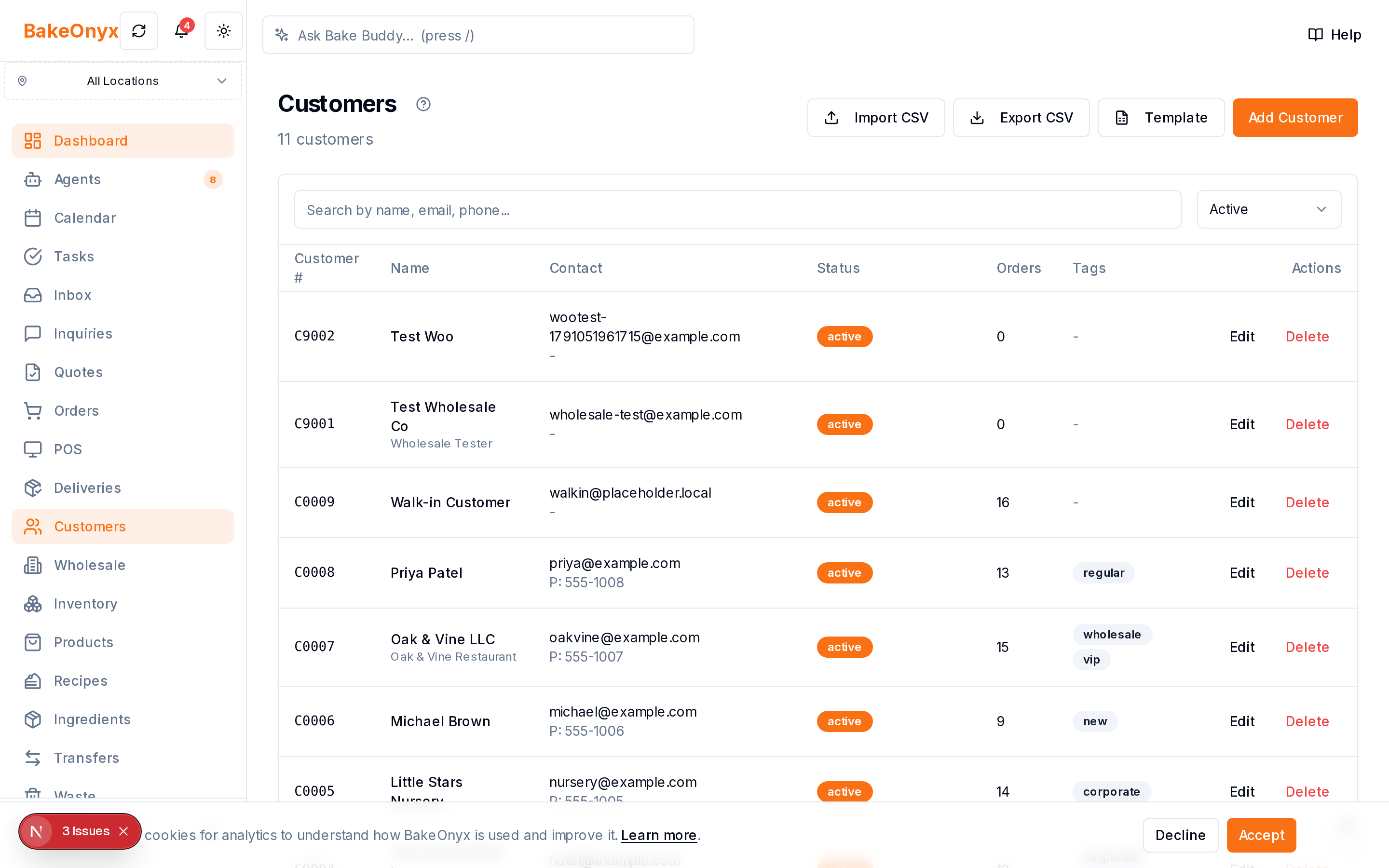
Most bakeries manage customer information the way they have for decades: memory, loose notes, or a Google Sheet that gets out of sync. This works until it doesn't.
A regular calls in an order. You ask, "The usual?" They say yes. But what is the usual? You flip through old receipts or ask them to remind you—wasting both your time and theirs. Or worse, you get it wrong, and a customer with a nut allergy receives a product with tree nuts, creating a safety issue and damaging trust.
You also can't easily answer questions like: Who are my top 10 customers by order frequency? Which customers buy the most expensive items? Who haven't ordered in 6 months? Without this visibility, you miss opportunities to upsell, re-engage lapsed customers, or simply say thank you to your best supporters.
How BakeOnyx Customer CRM Works
Step 1: Create or Import a Customer Profile
When a new customer places an order in BakeOnyx, their profile is created automatically. If you're switching from another system, you can import existing customer data so no history is lost. Each profile lives in one central location, ready to be enriched.
Step 2: Log Order History and Preferences
Every time a customer orders—whether in-person, by phone, or online—that order is recorded on their profile. Over time, BakeOnyx builds a complete order history: what they bought, when they bought it, how much they spent, and any special requests or notes you added ("always asks for extra scoring on sourdough," "prefers items fresh, not day-old").
Step 3: Record Allergens and Dietary Restrictions
This is the safety-critical piece. When you first meet a customer, you can flag their allergens and dietary restrictions directly on their profile—nut-free, gluten-free, vegan, dairy-free, or any combination. These flags stay visible every time they order, so you never accidentally miss an allergy.
Step 4: Retrieve Full Context Before Processing an Order
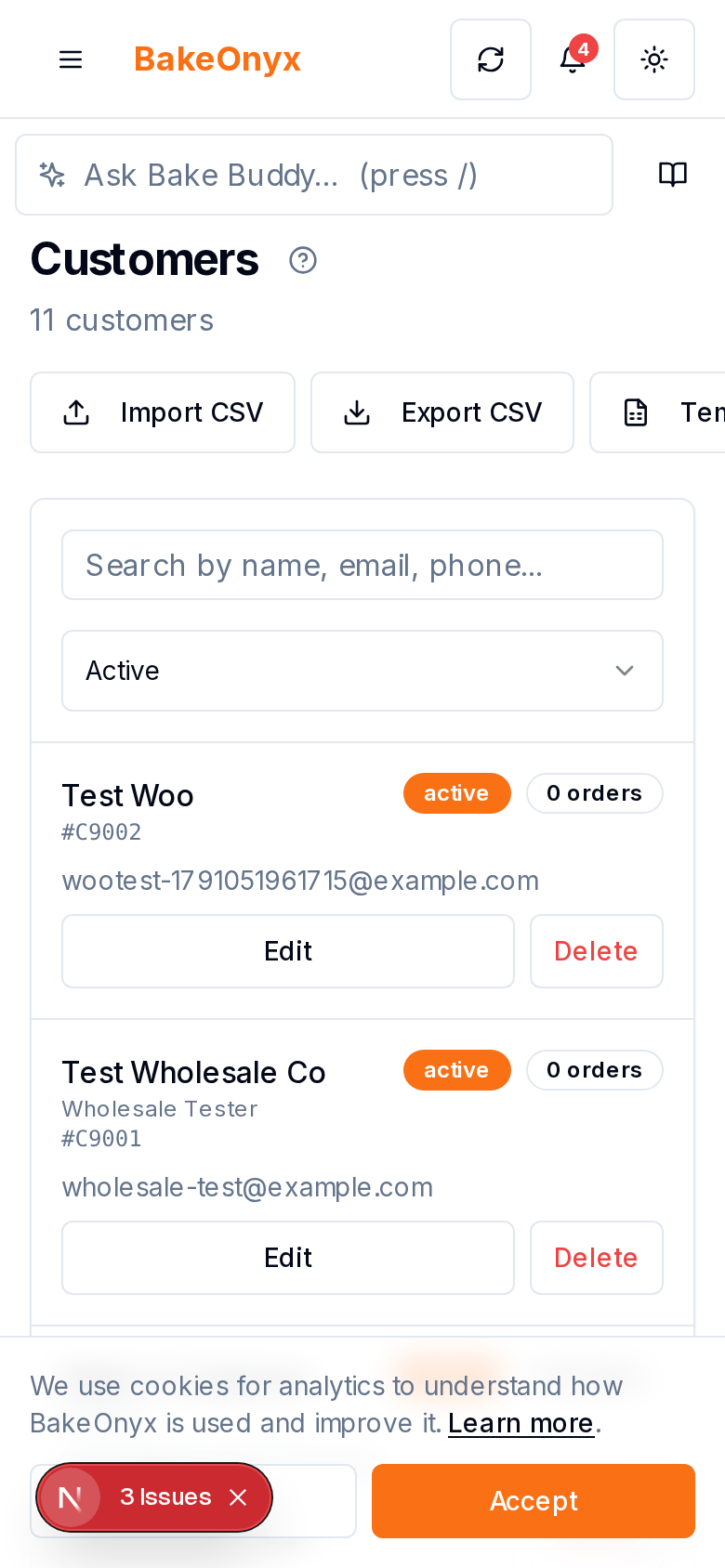
When a regular customer calls or walks in, search for their name in BakeOnyx. Their complete profile appears instantly: their allergen flags, their last five orders, their favorite items, and any notes you've left for yourself. You can say, "Hi Sarah—the usual dozen sourdough with extra scoring?" with confidence, or offer a new item based on what you know they like.
Step 5: Use Customer Data to Grow Your Business
BakeOnyx lets you see which customers are your most valuable—sorted by order frequency, total spend, or recency. You can use this to identify VIPs for special offers, spot customers who haven't ordered in a while and reach out, or simply understand who keeps your business running.
Real-World Impact
When you stop re-asking regulars for details, two things happen: your team works faster, and customers feel genuinely known. A repeat order that once required clarification and note-flipping now takes seconds. Your staff can focus on baking and hospitality instead of information-gathering. And because allergen flags are always visible, you eliminate the guesswork that creates safety risks.
For a bakery with 50+ regular customers, this compounds. You're not just saving 2–3 minutes per order; you're building a system where your best customers are recognized, their preferences are honored, and their safety is guaranteed.
Start Building Customer Relationships, Not Just Transactions
BakeOnyx Customer CRM turns your customer data from scattered notes into a strategic asset. You'll know your regulars better, serve them faster, and catch allergen issues before they happen.
Ready to see how it works? Start a free trial of BakeOnyx today and build your first customer profiles.
The summary, FAQ, and statistics in this section were compiled from public sources and reviewed by the BakeOnyx editorial team. AI-assisted research.
Frequently Asked Questions
Can I import my existing customer data into BakeOnyx?▾
Yes. If you're switching from another system or have customer records elsewhere, you can import them into BakeOnyx so your order history and customer details aren't lost. Contact BakeOnyx support for import assistance.
How does BakeOnyx help me spot my most valuable customers?▾
BakeOnyx lets you view your customer list sorted by order frequency, total spend, or how recently they ordered. This makes it easy to identify your top customers, reward their loyalty, or re-engage those who haven't ordered recently.
Is allergen tracking secure and reliable?▾
Allergen flags are stored directly on each customer's profile and appear every time they place an order, so you have a consistent, visible reminder. This eliminates the risk of forgetting or losing allergy information in scattered notes.
Do I have to manually enter every order, or is it automatic?▾
Orders placed through BakeOnyx are automatically added to the customer's profile. If you take orders by phone or in person, you log them into BakeOnyx, and they're instantly recorded on the customer's history.
Can my entire team see and update customer profiles?▾
Yes. Your team can search customer profiles, view order history and allergens, and add notes. This ensures everyone on your team has access to the same accurate customer information.
BakeOnyx Team
Contributing writer at BakeOnyx. Covering bakery business management, recipe costing, and baking industry trends.
Related Posts
Unified Inbox: Reply to All Customer Messages in One Place
Stop switching between email, WhatsApp, and social DMs. BakeOnyx's Unified Inbox lets you read and reply to every customer message in one place—with order history right there.
Bakery Quote Software: Build & Accept Quotes Online
Stop typing quotes in Word. BakeOnyx's Quotes feature lets you build polished, itemised quotes, send them online, and convert accepted quotes into orders instantly.
Bakery Standing Order Software: Automate Recurring Wholesale Orders
Stop manually re-entering the same wholesale order every week. BakeOnyx's Recurring & Standing Orders feature generates repeat customer orders automatically on your schedule.
Related Product Guides
Explore Related Features
Ready to get your time back?
Join hundreds of baking businesses using BakeOnyx to manage orders, recipes, and inventory.
Start Your Free Trial