Bake by Time: Fresh Orders Ready When Customers Pick Up
Stop baking everything at once. BakeOnyx's Bake by Time feature shows you exactly what to bake and pull for each pickup and delivery window, so every order arrives fresh and on time.
Quick answer
BakeOnyx's Bake by Time feature organizes your bake schedule by customer pickup and delivery windows, showing you exactly what to bake and when. Every order stays fresh and ready on time, eliminating chaotic morning rushes and stale afternoon products.
The Morning Crunch: Why Bakeries Bake Everything at Once
It's 5 a.m. at your bakery. You have orders due at 9 a.m., noon, and 3 p.m. But you don't have a clear view of which items go into which time slot. So you do what most bakery owners do: bake everything now, hope it's ready, and pull orders as they come.
The result? Croissants that are stale by pickup time. Donuts that sit in the case for hours. Staff pulling the wrong items for the wrong customers. Wasted product. Frustrated customers. And you're exhausted before lunch.
This is the bakery scheduling problem that costs time and money every single day.
Introducing BakeOnyx's Bake by Time Feature
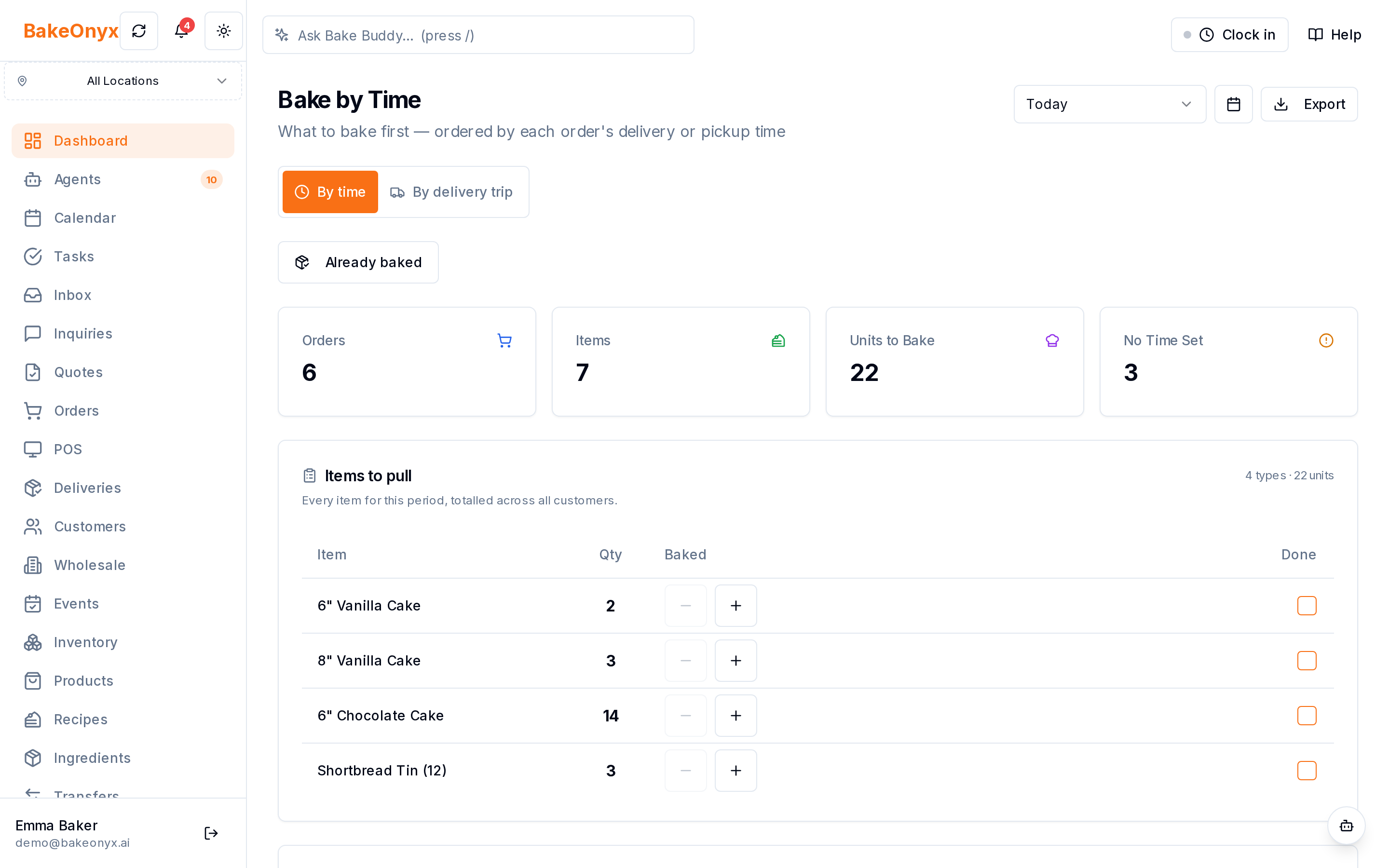
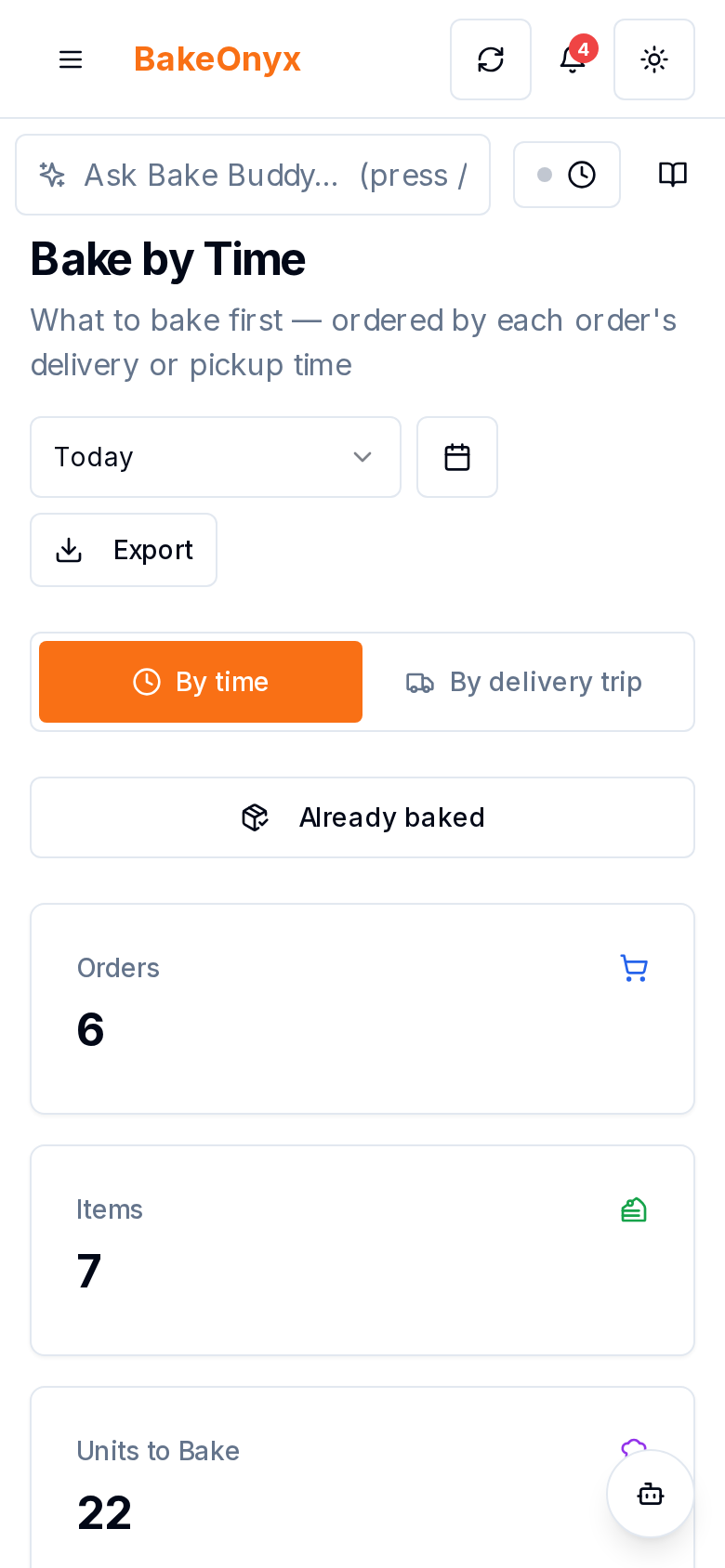
Bake by Time is a BakeOnyx feature designed to eliminate the guesswork from your bake schedule. Instead of baking everything in one chaotic rush, you see exactly what needs to be baked and pulled for each pickup and delivery time window. Every item is matched to its deadline, so you bake fresh and pull on time—every time.
This means:
- No more massive morning rushes. Your bake schedule spreads across the day based on actual customer pickup times.
- Every item is fresh when it's due. You bake items close to their pickup time, not hours in advance.
- Staff pulls the right items at the right time. No more confusion about which orders go out when.
- You see totals per time window. Know exactly how many croissants, donuts, or loaves you need for the 9 a.m. slot versus the 3 p.m. slot.
How It Works
Step 1: Load Your Orders Into BakeOnyx
Your customer orders (from your website, POS, or manual entry) are already in BakeOnyx with their pickup or delivery times. Each order is tagged with when the customer expects it.
Step 2: View Your Bake Schedule by Time Window
Open the Bake by Time view in BakeOnyx. You'll see your day organized by pickup and delivery windows—not by product type or random order. For example:
- 9:00 a.m. pickup: 12 croissants, 8 chocolate chip cookies, 4 sourdough loaves
- 12:00 p.m. pickup: 6 croissants, 15 donuts, 2 focaccia
- 3:00 p.m. delivery: 20 cupcakes, 10 brownies, 5 custom cakes
Each time window shows you the total quantity of every item needed for that slot. No math required. No guessing.
Step 3: Plan Your Bake Schedule Around Pickup Times
Now you know when each item needs to be ready. You can work backward from each pickup time to decide when to start baking. A croissant that takes 2 hours to proof and bake, due at 9 a.m.? Start it at 7 a.m. A chocolate chip cookie that's ready in 20 minutes, due at 3 p.m.? Bake it at 2:40 p.m.
Your team can see the same schedule and coordinate who bakes what and when—no more conflicting priorities or miscommunication.
Step 4: Pull Orders on Time
As each pickup window approaches, your staff knows exactly which items to pull and in what quantities. The Bake by Time view keeps items organized by deadline, so there's no scrambling to find orders or pulling items too early (where they get stale) or too late (where customers wait).
Step 5: Track What's Ready
As items are baked, you can mark them as complete in BakeOnyx. This gives you and your team a real-time view of what's done and what still needs to go in the oven before each pickup window closes.
Why This Saves Time and Money
Less waste. You're not baking hours ahead of time and throwing away stale items. You bake closer to pickup, so more products sell at full quality and price.
Faster workflow. Your team isn't running around trying to figure out what goes where. The schedule is clear. Everyone knows their role.
Happier customers. Fresh items ready exactly when promised builds loyalty and reduces complaints.
Lower stress. The morning crunch becomes a managed workflow. You're not juggling multiple time windows in your head—BakeOnyx does it for you.
Real-World Example
Imagine you run a mid-size bakery with three daily pickup windows. Before Bake by Time, you'd bake all 200+ items between 4 a.m. and 8 a.m., then spend the day pulling and packing. Your 9 a.m. customers get fresh items. Your 3 p.m. customers get day-old.
With Bake by Time in BakeOnyx, you see that the 9 a.m. slot needs 60 items (which you bake 4–8 a.m.), the noon slot needs 80 items (baked 10 a.m.–12 p.m.), and the 3 p.m. slot needs 70 items (baked 1–3 p.m.). Every customer gets fresh. Your team works steadily all day instead of sprinting in the dark. You waste less. You sell more.
Get Started With Bake by Time
If you're tired of the morning rush and stale afternoon orders, Bake by Time in BakeOnyx is built for you. It's one of the tools that helps bakeries work smarter, not just harder.
Ready to see how your bake schedule could run? Start a free trial of BakeOnyx today and set up your first Bake by Time schedule. No credit card required.
The summary, FAQ, and statistics in this section were compiled from public sources and reviewed by the BakeOnyx editorial team. AI-assisted research.
Frequently Asked Questions
How does Bake by Time know when each order is due?▾
Each customer order in BakeOnyx includes a pickup or delivery time. Bake by Time automatically groups orders by these time windows so you see all items due at 9 a.m., noon, 3 p.m., etc. in one view.
Can I adjust my bake schedule if I add a last-minute order?▾
Yes. When a new order is added to BakeOnyx, it appears in the Bake by Time view for its pickup window. You can immediately see the updated totals and adjust your baking plan.
Does Bake by Time tell me when to start baking each item?▾
Bake by Time shows you what's due and when. You use your knowledge of bake times to work backward—for example, if croissants are due at 9 a.m. and take 2 hours, you know to start at 7 a.m. Some bakeries use notes or a separate timer to track start times.
What if I have orders for delivery and pickup at the same time?▾
Bake by Time groups all orders by their time window, whether pickup or delivery. You'll see the total quantity needed for that window, so you can bake enough for both.
Can multiple team members see the same Bake by Time schedule?▾
Yes. Your team can access the Bake by Time view in BakeOnyx, so everyone sees the same schedule and knows what needs to be baked and pulled for each time window.
BakeOnyx Team
Contributing writer at BakeOnyx. Covering bakery business management, recipe costing, and baking industry trends.
Related Posts
Boost Bakery Sales: Master Your Holiday Pre-Order Strategy
Unlock peak holiday sales by optimizing your bakery's pre-order strategy. Learn how to streamline processes, manage demand, and delight customers with essential tips.
Bakery Delivery Route Planner: Optimize Routes & Hit Time Windows
Stop wasting time planning routes by hand. BakeOnyx's Delivery Route Planner automatically orders your daily stops, respects customer time windows, and prints run sheets for each driver.
Baker's Summary: Print One Sheet, Bake Everything Daily
Stop adding up order tickets by hand. BakeOnyx's Baker's Summary prints one sheet with every product to bake today, totalled across all orders.
Related Product Guides
Explore Related Features
Ready to get your time back?
Join hundreds of baking businesses using BakeOnyx to manage orders, recipes, and inventory.
Start Your Free Trial