Bakery Standing Order Software: Automate Recurring Wholesale Orders
Stop manually re-entering the same wholesale order every week. BakeOnyx's Recurring & Standing Orders feature generates repeat customer orders automatically on your schedule.
Quick answer
BakeOnyx's Recurring & Standing Orders feature lets bakery owners set up a wholesale customer's order once, then automatically generate it on a repeating schedule—eliminating manual re-entry and preventing missed deliveries.
The Weekly Re-Entry Trap
If you run a wholesale bakery, you know the routine: every Monday morning, the same café calls in their weekly order. Twelve croissants. Eight sourdough loaves. Five dozen chocolate chip cookies. You write it down, punch it into your system, and do it all again next week.
Now multiply that by ten regular customers. Or twenty.
What starts as a simple standing order becomes a time sink. Someone forgets to enter it. A delivery gets missed because no one flagged it on the production calendar. Your admin overhead grows with every new wholesale account, and you're spending hours each month on data entry that never changes.
There's a better way.
How Recurring & Standing Orders Works
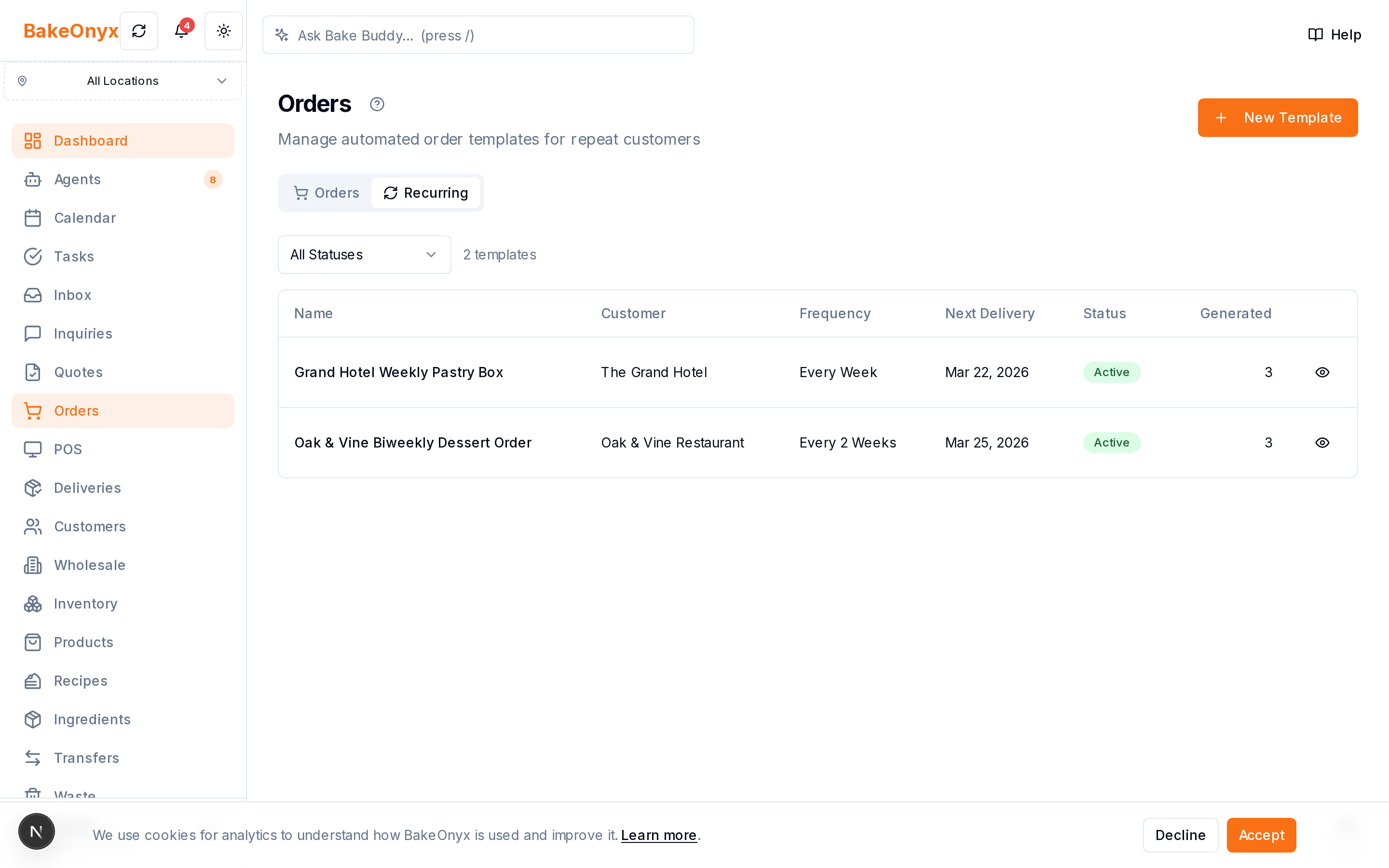
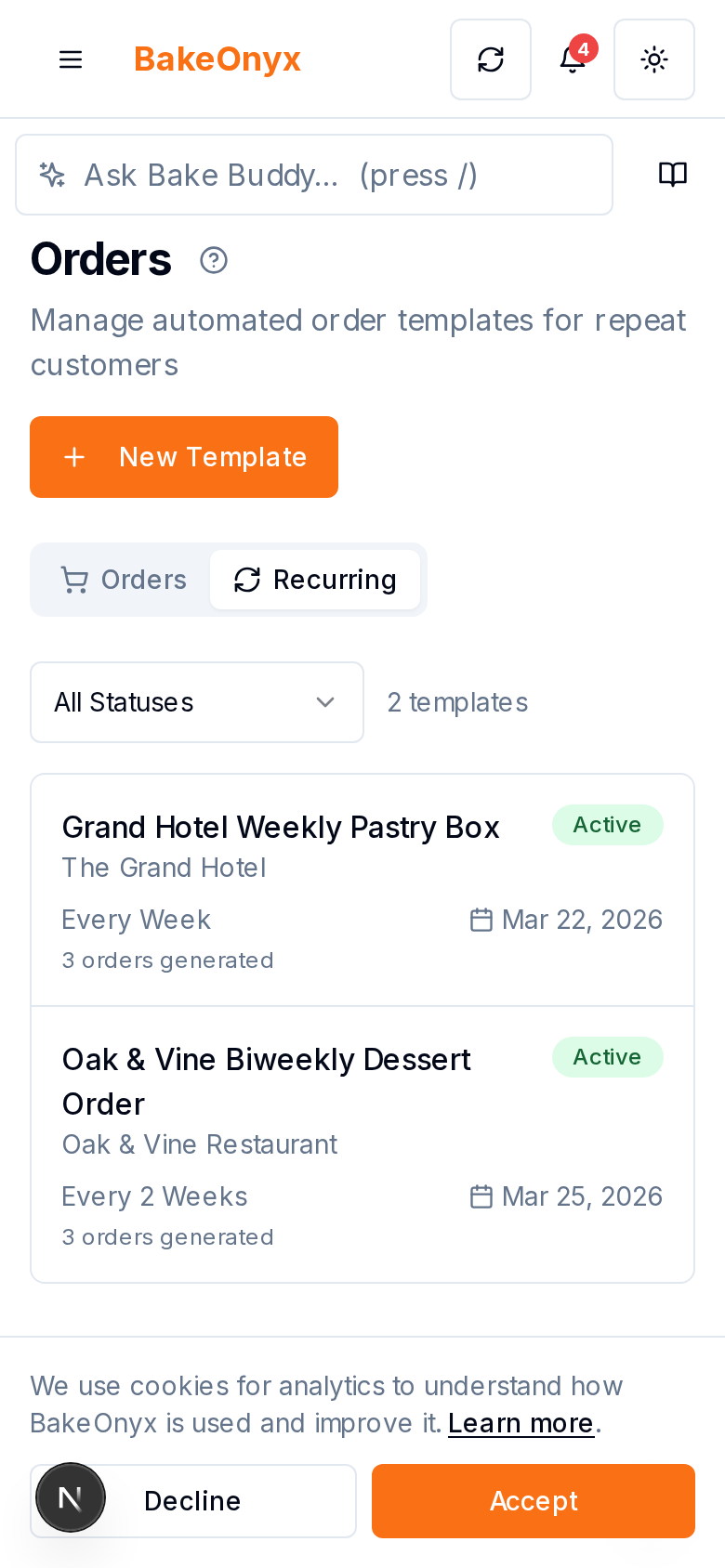
BakeOnyx's Recurring & Standing Orders feature lets you set up a wholesale customer's order once, then let it generate itself automatically on the schedule you define. No re-keying. No forgotten deliveries. Just orders that appear exactly when they should.
Step 1: Create the Standing Order Template
Start by opening the customer's profile in BakeOnyx. Instead of creating a one-time order, you'll select the option to set up a standing order. This is where you define what gets ordered: quantities, product types, delivery date, and frequency.
For your café customer, that might be: 12 croissants, 8 sourdough loaves, 5 dozen cookies, every Monday, delivered Tuesday morning.
Step 2: Set Your Frequency and Schedule
Define how often the order repeats. Weekly orders are the most common for wholesale bakeries, but you can configure standing orders for bi-weekly, monthly, or any interval that matches your customer's needs.
BakeOnyx will automatically generate each order on the day you specify, so your production team sees it on the calendar without any manual trigger.
Step 3: Orders Generate Automatically Each Cycle
When the scheduled date arrives, BakeOnyx creates the order in your system automatically. It appears on your production calendar, in your inventory tracking, and in your delivery schedule—just as if you'd entered it manually, but without the work.
Your team sees the same order, at the same time, every cycle. No surprises. No missed deliveries.
Step 4: Modify or Pause as Needed
Standing orders aren't rigid. If your café customer needs extra croissants one week, you can adjust that single order without touching the template. If they're closed for a holiday, you can pause the standing order for that cycle and resume it automatically the next week.
Changes to the standing order template itself apply to all future orders, so you can update quantities or delivery dates once and have it cascade forward.
Why This Saves You Time and Money
Eliminate repetitive data entry. For a bakery with 15 wholesale customers on standing orders, you could save 5–10 hours per month just by not re-keying the same orders repeatedly.
Prevent missed deliveries. When orders generate automatically, they're harder to forget. Your production and delivery teams have a reliable, consistent schedule.
Scale without scaling admin. As you add more wholesale accounts, your administrative burden doesn't grow proportionally. The system handles the repetition.
Reduce errors. Manual order entry is where typos and quantity mistakes happen. Automated orders are consistent and accurate.
When Recurring & Standing Orders Makes Sense
This feature is built for bakeries with wholesale customers—cafés, restaurants, corporate accounts, or retail partners who order the same products on a predictable schedule.
If you have even three or four regular wholesale customers, the time savings justify using standing orders. If you have ten or more, it's essential.
Getting Started with Standing Orders in BakeOnyx
Setting up your first standing order takes just a few minutes. Start with your most reliable wholesale customer—the one whose order you could recite in your sleep—and let BakeOnyx handle the rest.
Once you see how much admin time disappears, you'll want to set up standing orders for every regular wholesale account.
Ready to stop re-entering the same orders every week? Start a free trial of BakeOnyx and automate your wholesale workflow today.
The summary, FAQ, and statistics in this section were compiled from public sources and reviewed by the BakeOnyx editorial team. AI-assisted research.
Frequently Asked Questions
Can I modify a standing order for a single week without changing the template?▾
Yes. You can adjust any individual order generated from a standing order template without affecting future orders. The template remains unchanged, so subsequent cycles generate as originally defined.
What frequencies does BakeOnyx support for standing orders?▾
BakeOnyx supports common wholesale schedules including weekly, bi-weekly, and monthly standing orders. You define the frequency and the day of the week or date each order should generate.
What happens if I need to pause a standing order temporarily?▾
You can pause a standing order for specific cycles without deleting it. This is useful for customer holidays or seasonal breaks. Resume it whenever you're ready, and the automatic generation picks up again.
Does the standing order appear on my production calendar automatically?▾
Yes. Each automatically generated order appears on your production calendar, inventory system, and delivery schedule just as if you'd entered it manually, so your team sees it without extra steps.
Can I update a standing order template and have it apply to future orders?▾
Yes. Changes to the standing order template—like quantity adjustments or delivery date shifts—apply to all future orders generated from that template going forward.
BakeOnyx Team
Contributing writer at BakeOnyx. Covering bakery business management, recipe costing, and baking industry trends.
Related Posts
Unified Inbox: Reply to All Customer Messages in One Place
Stop switching between email, WhatsApp, and social DMs. BakeOnyx's Unified Inbox lets you read and reply to every customer message in one place—with order history right there.
Bakery Quote Software: Build & Accept Quotes Online
Stop typing quotes in Word. BakeOnyx's Quotes feature lets you build polished, itemised quotes, send them online, and convert accepted quotes into orders instantly.
Turn Wedding Inquiries Into Quotes in Minutes With BakeOnyx
Stop losing leads to slow responses. BakeOnyx Inquiries & Quotes turns customer requests into professional quotes instantly, so you respond before competitors do.
Related Product Guides
Explore Related Features
Ready to get your time back?
Join hundreds of baking businesses using BakeOnyx to manage orders, recipes, and inventory.
Start Your Free Trial